
How to Make the Damon Salvatore Church Scene AI Video From One Photo (2026)
A step by step tutorial with screenshots: walk into the church as Damon with your own photo, no CapCut template and no PixVerse link. What to upload, what it costs and how to fix a result that looks off.
Short answer: open the Damon Salvatore Church Scene AI page, keep the original church edit or tap Recreate this on any example, add one clear photo of yourself, check the price on the Generate button and tap it. The finished MP4 is ready in 3 to 8 minutes: the doors open, every head in the pews turns, you touch the holy water, walk the aisle and the close-up ends on the smirk, with you in Damon's place. Prices and screens below were checked on October 29, 2026.
What the Damon Salvatore Church Scene Trend Is
The scene is Damon Salvatore walking into a church memorial in The Vampire Diaries, cut to a slow song: the double doors, the congregation turning around, two fingers in the holy water, the walk down the aisle with a hand on his chest and the smirk in close-up. In mid October 2026 TikTok tutorials turned it into an AI trend where anyone takes his place, and new versions have been posted every hour since, most of them titled "damon salvatore church scene ai" or "Damon Salvatore church scene tutorial".
The tutorials on TikTok usually tell you to copy a link into CapCut or PixVerse and swap your face onto a sample person. The version below recasts the whole person from one photo instead, so the body, the outfit and the walk become yours too.
What You Need
- One photo. Face clearly visible, looking at the camera, no sunglasses and no hands in front of the face. Waist up or full body works best, because the scene shows you from the doors to the close-up.
- The outfit you want. The clothes in the photo are the clothes in the church. Dark clothes match the mood; a Halloween costume is the joke.
- Credits. Video is billed per second. The original church edit runs 20 seconds, which is 20 credits at 720p or 10 credits at 480p.
There is nothing to download, no template to find and no prompt to write.
Step 1: Open the Damon Salvatore Church Scene AI Page
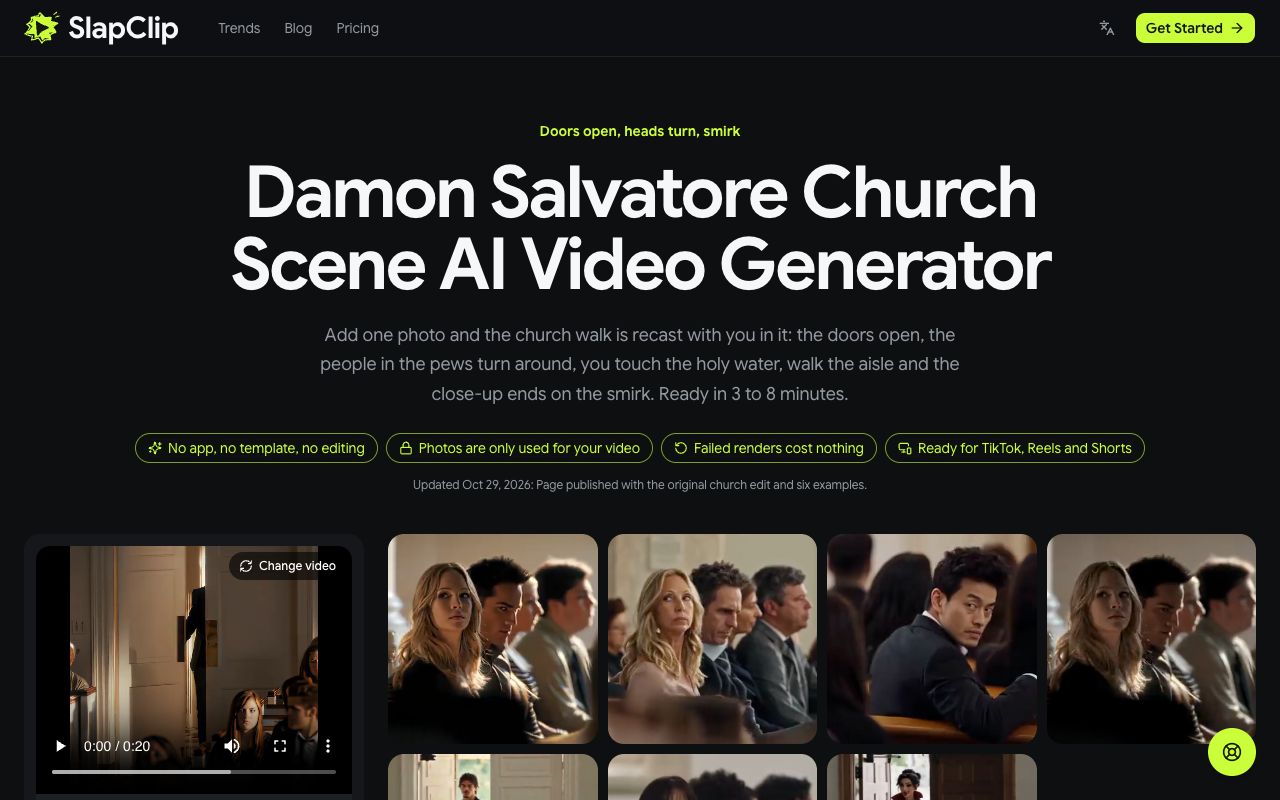
Go to slapclip.com/damon-salvatore-church-scene-ai. The generator sits on the left with the original church edit already loaded (The Original.mp4, 0:20); the wall of examples on the right shows versions other people made, from a guy in a white shirt to a schoolgirl with a pink backpack and a cartoon vampire.
Step 2: Pick the Clip You Want to Star In
You can keep the original, or start from any example. Tap an example to open it: you see the video with sound, how long it is, and a Recreate this button that shows its price. In the screenshot below, The Original is 20 seconds long, needs no prompt and costs 20 credits at 720p.
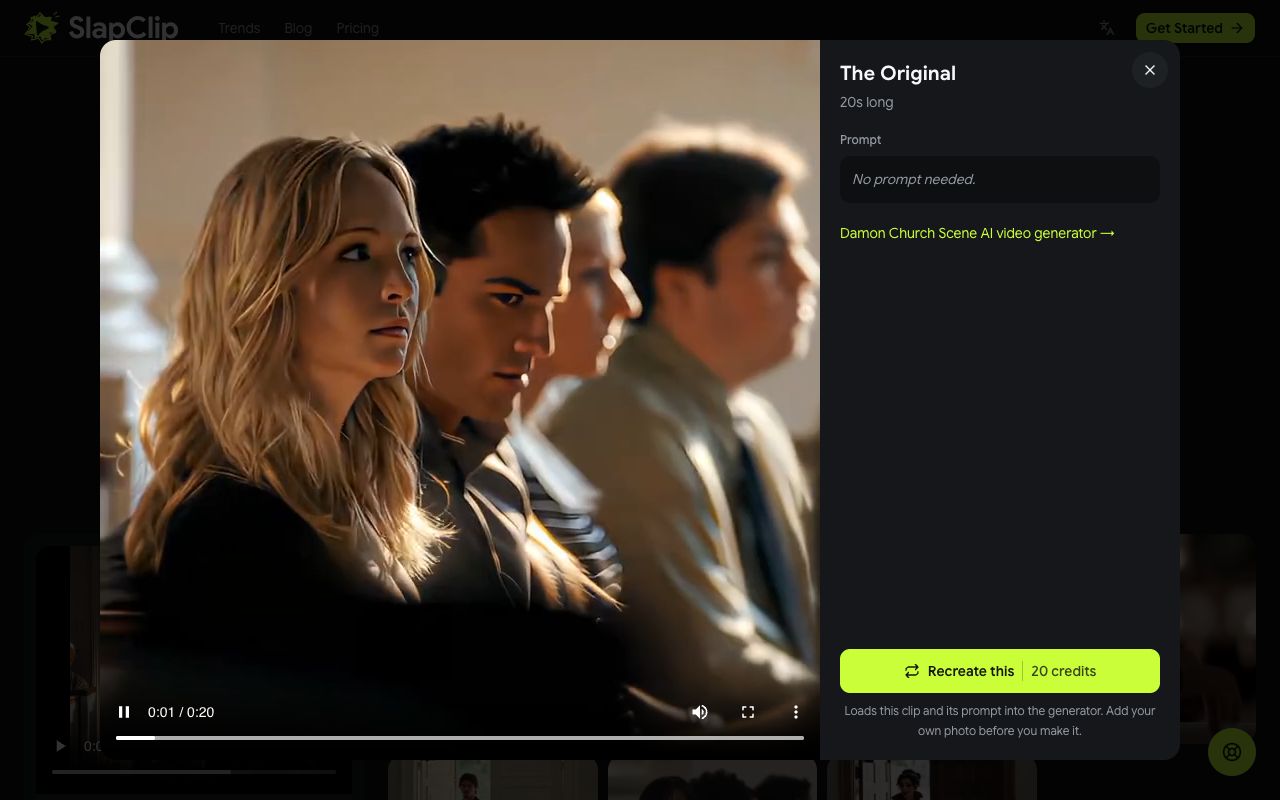
Recreate uses that exact video as the reference, so the result keeps its church, its cuts and its timing and only swaps in your person. Pick the take whose look you like most.
Step 3: Add Your Photo
After you tap Recreate this, a note confirms the clip is loaded and asks you to add your photo. Tap the + in the photo area under the clip and choose one picture of one person. The slot is labelled 1 · You.

If you are on a computer but your photos are on your phone, use Photos on your phone? Scan to upload and pick them on the phone.
Step 4: Check the Price and Generate
Below the photo you choose the resolution: 480p at 0.5 credits per second, 720p at 1 credit per second or 1080p at 3 credits per second. Until you pick one, the generator picks the sharpest size that one $9.99 Starter pack covers, which for the 20 second edit means 480p and 10 credits; a line under the sizes says so. The Generate button always shows the total before anything is charged.
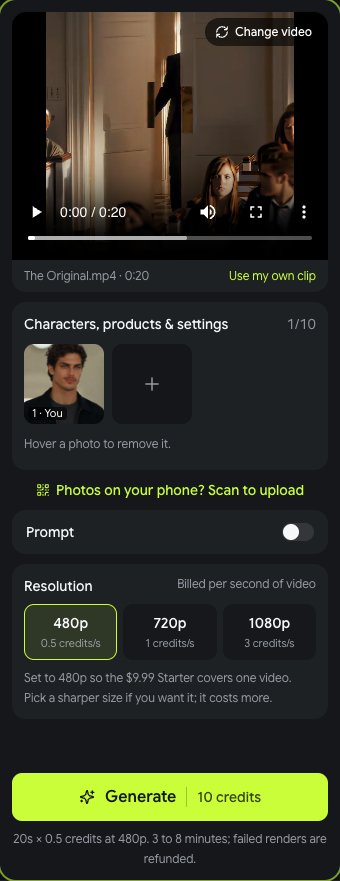
Tap Generate. Rendering takes 3 to 8 minutes, sometimes longer at busy times, and you can leave the page while it runs. When it is done, tap Download MP4 and post it.
What It Costs
Credits come in one time packs with no subscription: 15 credits for $9.99, 45 credits for $24.99 and 100 credits for $49.99 (prices on October 29, 2026). The 20 second church edit is 10 credits at 480p, so one Starter pack covers one video with 5 credits left, and 20 credits at 720p, which the 45 credit pack covers twice. Shorter examples cost less: the price on each Recreate button is the length of that clip times the per second rate. If a render fails, the credits go back to your balance automatically.
Tips for a Result That Looks Like You
- Look at the camera. The scene ends on a close-up, so a straight on, sharp face matters more here than for most trends.
- Show the body. A waist up or full body photo keeps your proportions right on the walk down the aisle.
- Even light. Soft daylight blends best with the warm light in the church.
- Dress the part. Black or dark clothes match the scene; a costume carries over too.
- Pick a clip close to your photo. If you only have a head and shoulders shot, start from an example that stays closer on the face.
Fixing a Result That Looks Off
- The face does not look like you. Swap in a sharper, closer photo and try again. Blurry or very small faces are the usual cause.
- The outfit is wrong. The outfit in the photo is the outfit in the video. Use a photo in the clothes you want, or switch on Prompt and describe them.
- The walk looks stiff. Try a full body photo standing up; a sitting photo can confuse the proportions.
Ideas People Are Making
- You, in black, the straight version.
- Your friend who never smiles, finally smirking.
- A Halloween costume reveal, since the scene is already a vampire's entrance.
- A couple, one video each from the same clip, posted side by side.
- A cartoon or character version, like the vampire doll example on the page.
You can see more on the trends page, and every other trend works the same way in the generator.
Frequently Asked Questions
Do I need the Damon Salvatore CapCut template?
No. The TikTok tutorials paste a link into CapCut or PixVerse and swap a face onto a sample person. On the Damon Salvatore Church Scene AI page the church edit is already loaded, you add one photo and the whole person is recast.
Can girls do the Damon Salvatore church scene trend?
Yes. Plenty of the videos on TikTok show girls walking in as Damon, and two of the examples on the page do too. The AI keeps your face, hair and build and copies the walk, the hand on the chest and the smirk.
How long is the video?
The original church edit is 20 seconds, square, with no watermark. Examples on the page vary in length, and the video you get is as long as the clip you pick.
Is there a free Damon Salvatore church scene AI generator?
Not here. Every video is a new AI render. The price is shown on the button before you start, and failed renders are refunded automatically.
Can I post it on TikTok?
Yes. Download the MP4 and post it on TikTok, Instagram Reels or YouTube Shorts. Label it as AI generated when you post, which both platforms ask creators to do.