
How to Make the Dime Dime Baby AI Video With Your Own Photo (2026)
A step by step tutorial with screenshots: take the dancer’s place in the Dime Dime Baby quinceañera clip from one photo. Which scene to pick, what it costs and how to get a result that looks like you.
Short answer: open the Dime Dime Baby AI page, tap an example in the scene you like (the quinceañera, a garage party, a garden party, a neon dance floor or a dance studio), tap Recreate this, add one clear front facing photo and tap Generate. In 3 to 8 minutes you get the walk in, the concha bite, the deadpan stare and the dance back, with you in the dancer's place. The original 9 second clip costs 9 credits at 720p. Prices and screens below were checked on October 28, 2026.
What the Dime Dime Baby Trend Is
The trend started with a TikTok posted by Eve Ramírez on July 24, 2025. At a quinceañera he dances toward the camera, bites into a concha, the Mexican sweet bread, and chews while staring straight into the lens. Set to the "dime, dime, baby" hook of BbY WOW by KAROL G, it came back as an AI trend in October 2026, with people swapping themselves, their friends, their dogs and even teddy bears into the dancer's place.
People search for it as "Dime Dime Baby AI", "Dime Dime Baby meme", "the concha guy trend" or "quinceañera dance AI". It is all the same clip.
What You Need
- One photo of one person. Facing the camera, face fully visible. Full body is a bonus.
- The outfit you want to see. The outfit in your photo is the outfit in the video, so a suit or a party dress makes it feel right.
- Credits. Video is billed per second; the original clip is 9 seconds, which is 9 credits at 720p.
No dance moves, no template app and no prompt are needed.
Step 1: Open the Dime Dime Baby AI Page
Go to slapclip.com/dime-dime-baby-ai. The generator on the left opens with the original clip; the examples on the right show the same dance in different scenes and with different people, from a hoodie in a garage to a teddy bear.

Step 2: Pick Your Scene
Tap the example whose scene you want. It opens with sound, shows how long it is, the reference video and photo it was made from, and a Recreate this button with its price. In the screenshot, The Quince Guy is 9 seconds long and costs 9 credits.
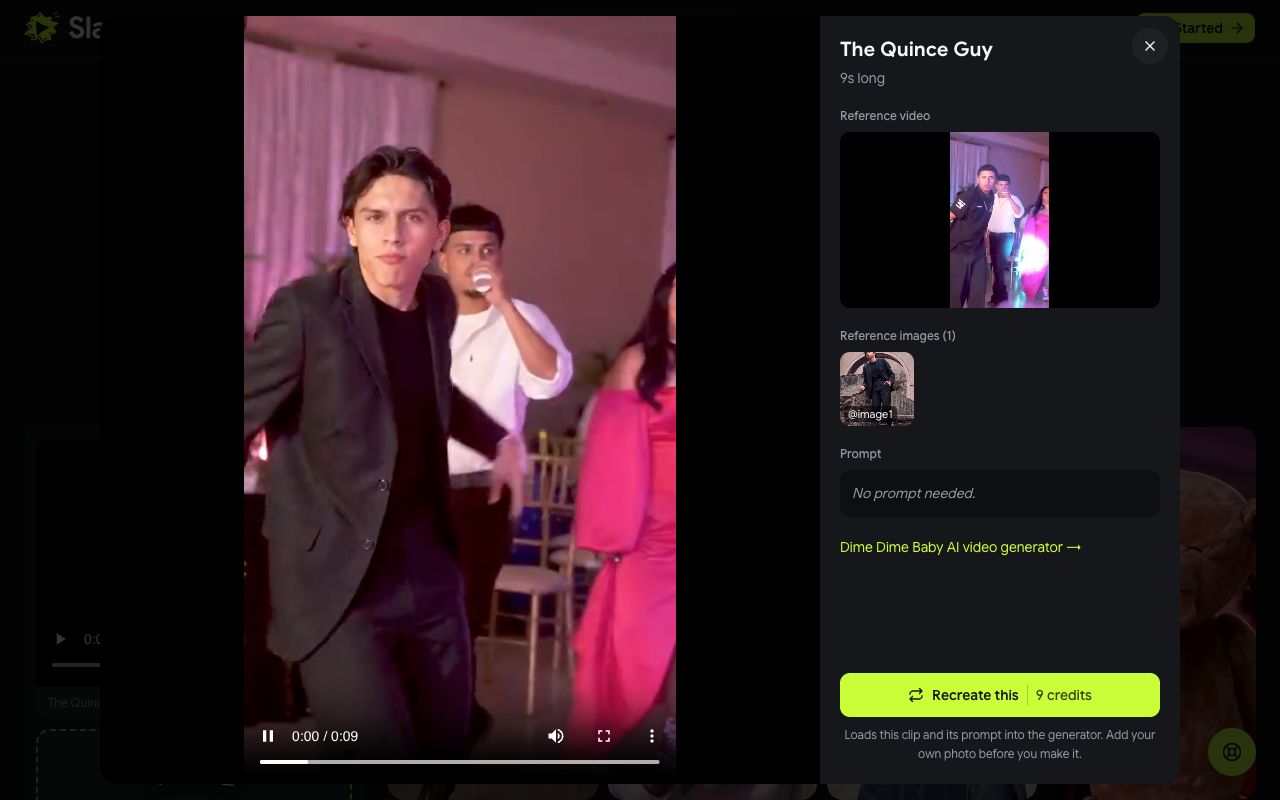
This matters more on this page than on most: Recreate uses the example's own video as the reference, so you land in exactly that scene. Pick the garage example and you dance in the garage; pick the dance studio and you get the studio.
Step 3: Add Your Photo
Tap Recreate this. The clip loads into the generator, and the photo slot labelled 1 · You waits for your picture. Tap the + and choose it.
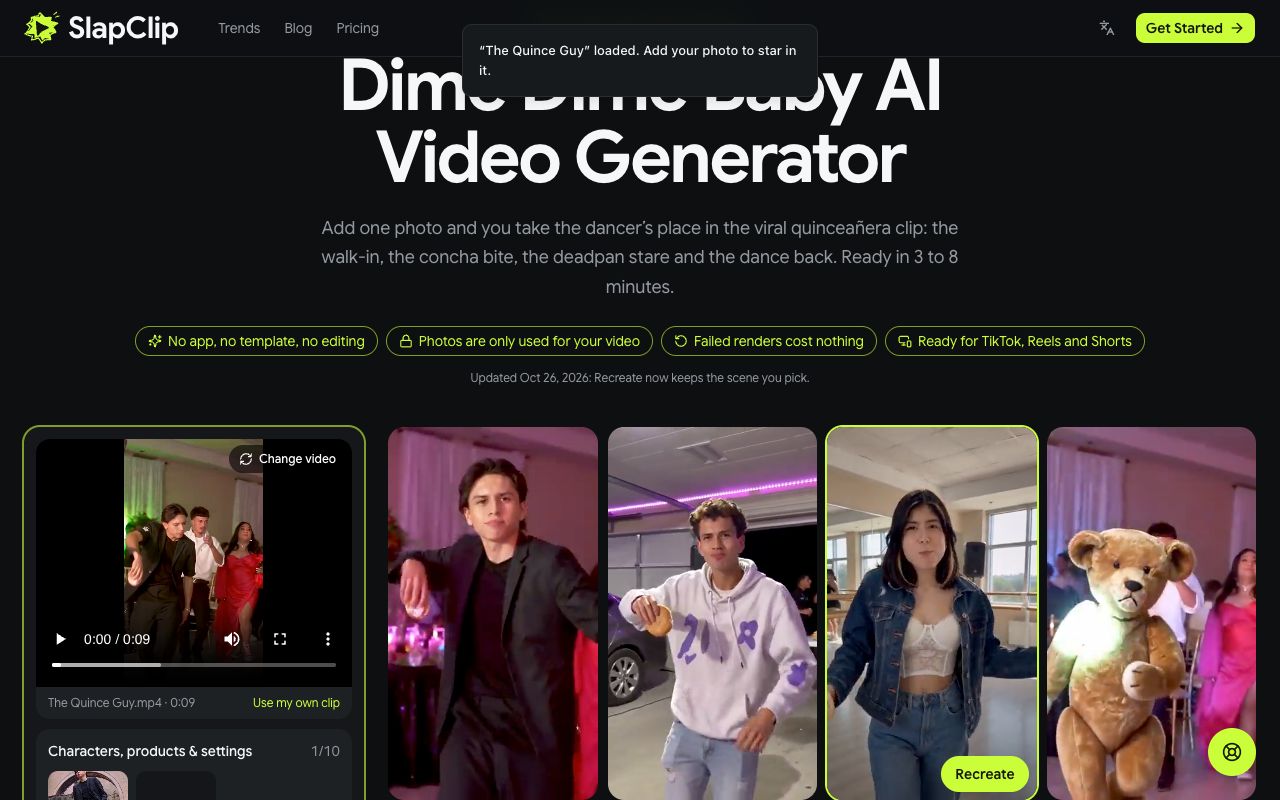
On a computer with photos on your phone, tap Photos on your phone? Scan to upload.
Step 4: Check the Price and Generate
Choose a resolution: 480p at 0.5 credits per second, 720p at 1 credit per second (the default) or 1080p at 3 credits per second. The Generate button shows the total before anything is charged. For The Quince Guy at 720p it reads 9 credits.
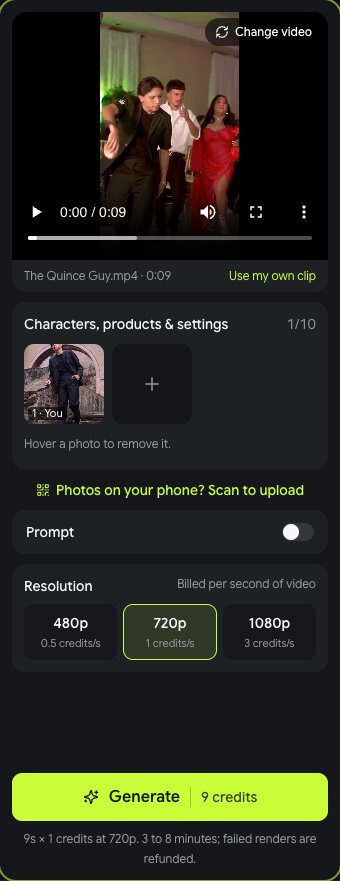
Tap Generate. It usually takes 3 to 8 minutes; you can leave the page. Then tap Download MP4. The song is not added for you: pick BbY WOW from the TikTok or Instagram music library when you post.
What It Costs
Credits come in one time packs with no subscription: 15 credits for $9.99, 45 credits for $24.99 and 100 credits for $49.99 (prices on October 28, 2026). At 9 credits for the original at 720p, the smallest pack makes one video with credits to spare, and the 45 credit pack makes five. Every example shows its own price on the Recreate button, and failed renders are refunded automatically.
Tips for a Result That Looks Like You
- Face the camera. The dancer stares straight into the lens at the end. A front facing photo makes that stare yours.
- Show your outfit. A full body photo in the clothes you want keeps the look consistent through the dance.
- Even light, no filters. Beauty filters and heavy shadows change the face the model learns from.
- One person per photo. If a friend is in the picture, crop them out first.
- Match the scene. A party outfit fits the quinceañera; a hoodie fits the garage.
Fixing a Result That Looks Off
- The face drifts during the dance. Use a sharper, closer photo. Small or blurry faces are the usual cause.
- The wrong person was swapped. Some scenes have people in the background. Switch on Prompt and write "replace the dancer in front with @image1".
- The concha bite looks odd. Hands and food are the hardest part for any AI video model. Try the same photo on another scene, or retry once; failed renders cost nothing.
Ideas People Are Making
- Yourself at your own quinceañera, years later.
- The birthday person at their party, in the garden scene.
- Your dog in a tiny suit, which gets some of the biggest laughs.
- A best friend in the dance studio scene.
There are more trends on the trends page, and every one of them works the same way in the generator.
Frequently Asked Questions
Is there a Dime Dime Baby AI filter?
Not a filter, but a generator: the Dime Dime Baby AI page recasts the whole dancer from your photo, so your face, hair and outfit move through the clip instead of a face pasted on top.
How much does a Dime Dime Baby AI video cost?
The original 9 second clip costs 9 credits at 720p. With packs from $9.99 for 15 credits, that is about $6 at the smallest pack and less at larger ones. The exact price is on the button before you start.
Can my dog do the Dime Dime Baby dance?
Yes. Upload a clear photo of your dog facing the camera. Results vary more than with people, and failed renders are refunded automatically.
Can I use a photo of a child?
No. Photos of children are not allowed. Use your own photo, or an adult's who agreed.
What song is in the Dime Dime Baby trend?
BbY WOW by KAROL G, with Judeline and rusowsky. The song belongs to its rights holders, so it is not added to your video: pick it from the TikTok or Instagram music library when you post.