
How to Make the Hotel Lobby AI Video With Your Own Photos (2026)
A step by step tutorial with screenshots: put yourself and a friend into the Hotel Lobby AI video, the orange booth and the hanging mic. What to upload, what it costs and how to fix a result that looks off.
Short answer: open the Hotel Lobby AI page, keep the original performance or tap Recreate this on any example, add one clear photo of you in the first slot and one of your duo in the second (one photo works for a solo take), check the price on the Generate button and tap it. The finished MP4 is ready in 3 to 8 minutes with the orange booth, the hanging microphone and every move of the performance, now starring your two. Prices and screens below were checked on October 29, 2026.
What the Hotel Lobby AI Trend Is
The clip is "HOTEL LOBBY (Unc & Phew)", which Quavo and Takeoff performed for A COLORS SHOW in 2022: two rappers, a saturated orange set and one vintage microphone hanging between them. Since September 2026 people have been putting friends, couples, parents and pets into that frame, and the remakes spread across TikTok and X.
People search for it as "Hotel Lobby AI", "Hotel Lobby AI video", "Hotel Lobby trend", "orange booth trend" and "AI rap duo". They all mean the same thing: the orange booth with somebody else in it.
What You Need
- One or two photos. The first slot is labelled 1 · You, the second Your duo (optional). Front facing, face fully visible, good light; a phone selfie is fine.
- One face per photo. The photos do not need to be taken together. Two separate selfies end up side by side in the booth.
- Credits. Video is billed per second. The original performance runs 30 seconds, which is 30 credits at 720p or 15 credits at 480p.
There is nothing to download, no template to find in another app and no prompt to write.
Step 1: Open the Hotel Lobby AI Page
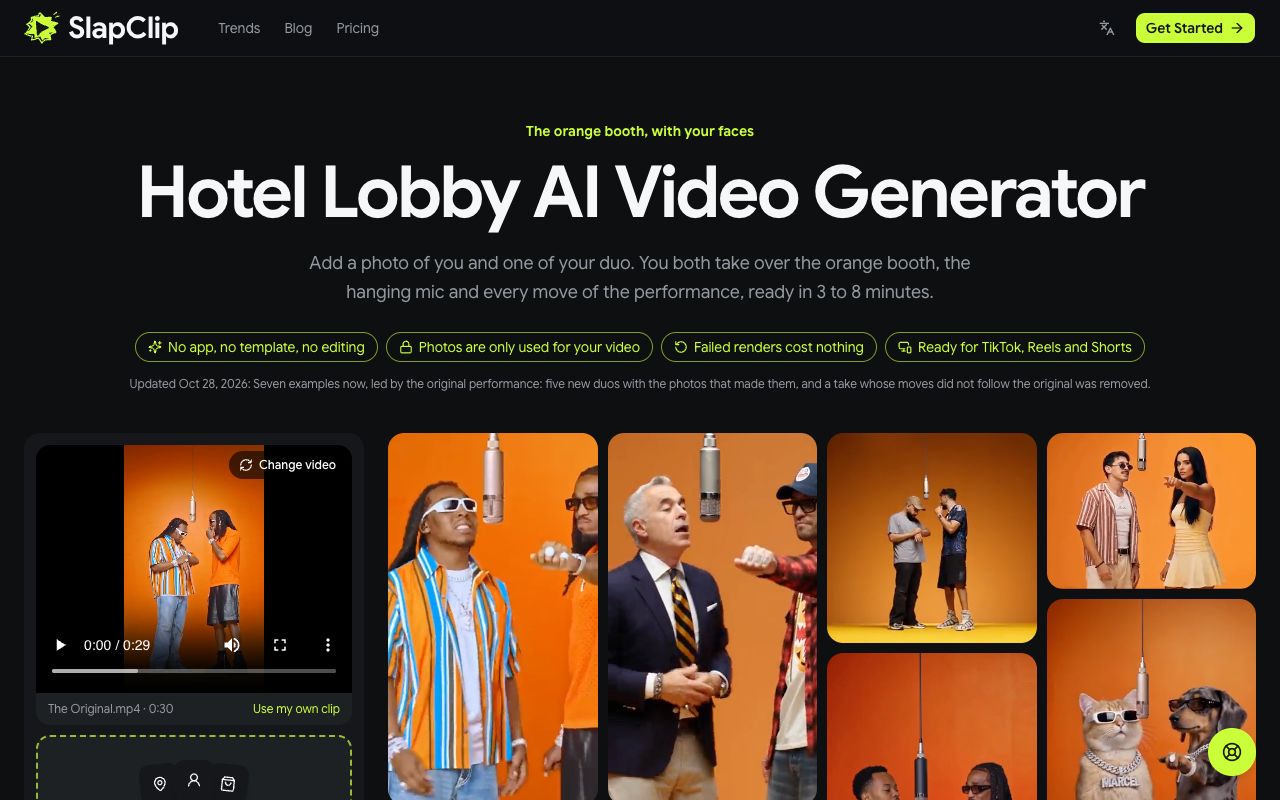
Go to slapclip.com/hotel-lobby-ai. The generator sits on the left with the original performance already loaded (The Original.mp4, 0:30); the wall of examples on the right shows versions other people made, from a man in a suit beside a guy in a flannel to two cats in chains.
Step 2: Pick the Clip You Want to Star In
You can keep the original, or start from any example. Tap an example to open it: you see the video with sound, how long it is, and a Recreate this button that shows its price. In the screenshot below, The Original is 30 seconds long, needs no prompt and costs 30 credits at 720p.
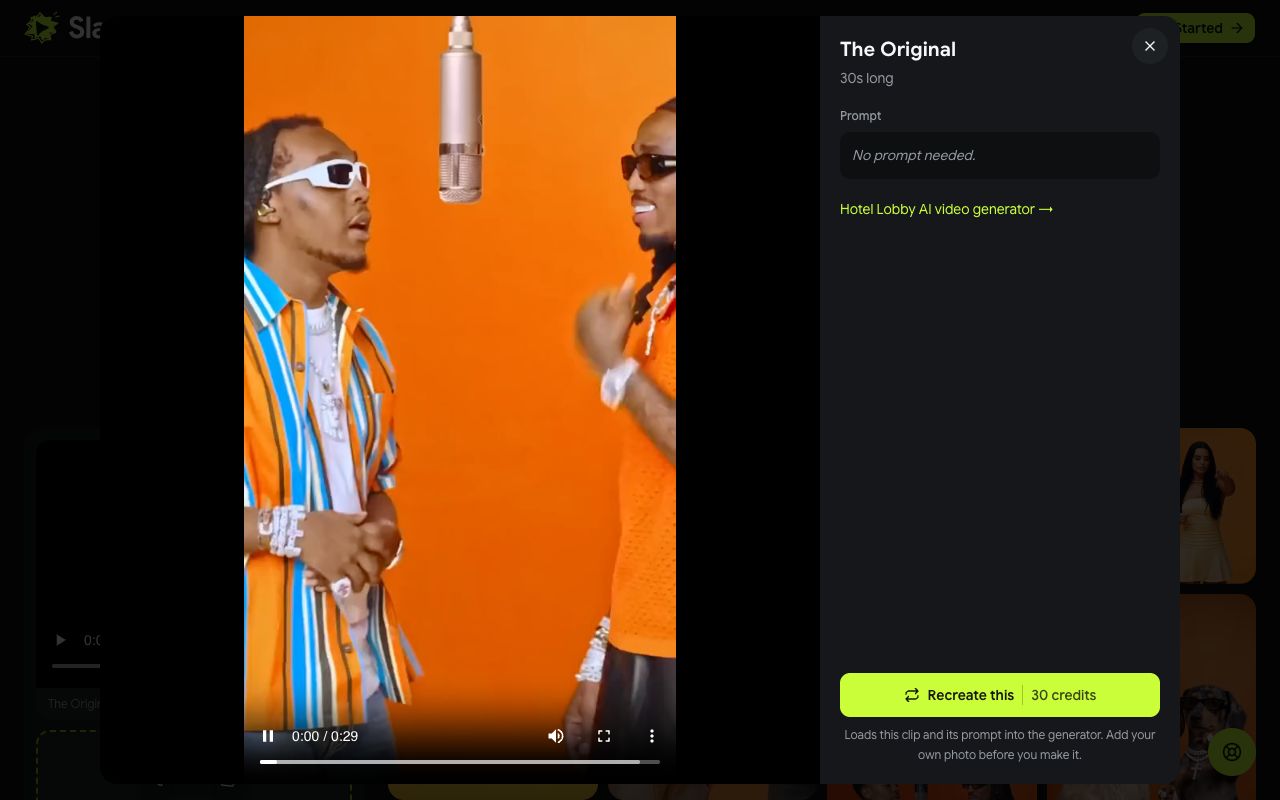
Recreate uses that exact video as the reference, so the result keeps its booth, its camera and its timing and only swaps in your people. The shorter examples cost less, because the price follows the length of the clip you pick.
Step 3: Add Your Photos
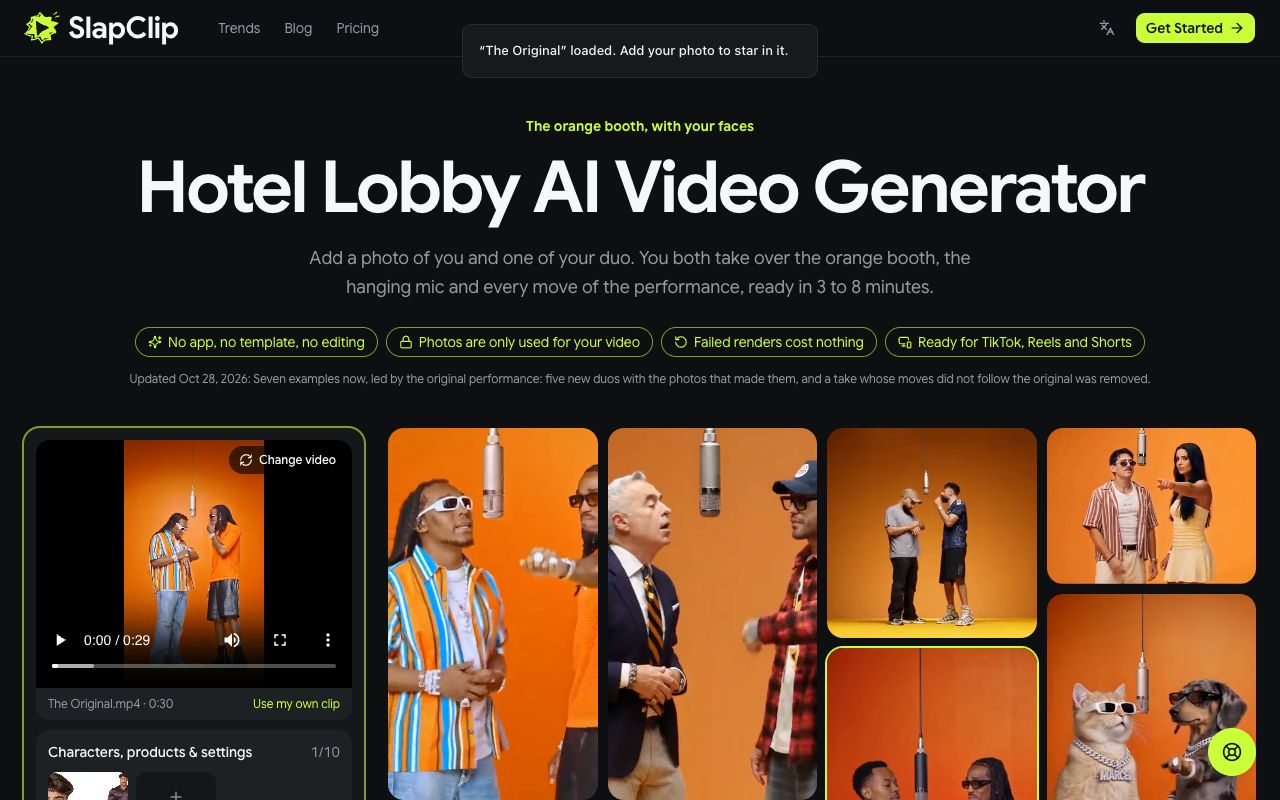
After you tap Recreate this, a note confirms the clip is loaded and asks you to add your photo. Tap the + in the photo area under the clip and choose a picture of you; the counter on the right shows how many photos are in.
Add a second photo for the other half of the duo, or leave the second slot empty for a solo take. If you are on a computer but your photos are on your phone, use Photos on your phone? Scan to upload and pick them on the phone.
Step 4: Check the Price and Generate
Below the photos you choose the resolution: 480p at 0.5 credits per second, 720p at 1 credit per second or 1080p at 3 credits per second. Until you pick one, the generator picks the sharpest size that one $9.99 Starter pack covers, which for the 30 second original means 480p and 15 credits. The Generate button always shows the total before anything is charged.
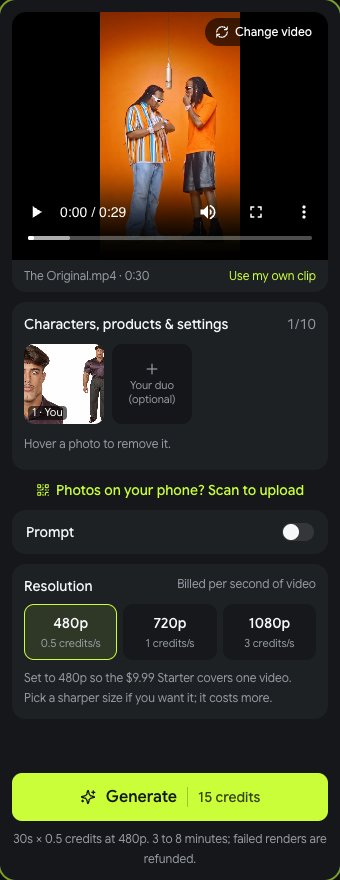
Tap Generate. Rendering takes 3 to 8 minutes, sometimes longer at busy times, and you can leave the page while it runs. When it is done, tap Download MP4 and post it.
What It Costs
Credits come in one time packs with no subscription: 15 credits for $9.99, 45 credits for $24.99 and 100 credits for $49.99 (prices on October 29, 2026). The 30 second original is 15 credits at 480p, so one Starter pack covers one full video, and 30 credits at 720p, which the 45 credit pack covers with 15 left over. Shorter examples cost less. If a render fails, the credits go back to your balance automatically.
Tips for a Result That Looks Like You
- Use front facing photos. Both performers face the camera most of the time; straight on photos give the model the most to work with.
- One face per photo. A group photo makes it guess who goes where.
- Even light. Daylight or a bright room. Harsh shadows end up baked into the face.
- Dress for the booth. The outfit in the photo is the outfit in the video. Orange, stripes and chains match the original; a suit is the joke.
- Pick a clip close to your photo. A take where the duo faces the camera more works better with head and shoulders photos.
Fixing a Result That Looks Off
- The face does not look like you. Swap in a sharper, closer photo and try again. Blurry or very small faces are the usual cause.
- The two of you are swapped. Switch on Prompt and say who goes where, for example "the person from @image1 on the left, the person from @image2 on the right".
- Only one of you is in the booth. Check that the second photo landed in the Your duo slot before you tapped Generate.
- The outfit is wrong. Use a photo in the clothes you want to see.
Ideas People Are Making
- You and your best friend, the most common version.
- A couple, one in a suit and one in a dress.
- A parent and child, both adults, trading verses.
- Two coworkers after a long week, in their work shirts.
- Two cats or a dog and its owner, which one of the examples on the page already shows.
You can see more on the trends page, and every other trend works the same way in the generator.
Frequently Asked Questions
Is there a Hotel Lobby meme generator?
Yes. The Hotel Lobby AI page is one: the performance is loaded for you, you add one or two photos and tap Generate. There is no app to install and the MP4 has no watermark.
Does the video have the Hotel Lobby song in it?
No. The song belongs to its rights holders, so it is not added here. Add the official "Hotel Lobby" sound from the TikTok or Instagram music library when you post, which is how most remakes were posted.
How long is the Hotel Lobby AI video?
The original performance is 30 seconds. The examples on the page run between 10 and 30 seconds, and the video you get is as long as the clip you pick.
Can I do it alone?
Yes. Leave the second slot empty and the booth is yours. For the full duo, add a second photo; it can be a separate selfie taken anywhere.
Can I post it on TikTok?
Yes. Download the MP4 and post it on TikTok, Instagram Reels or YouTube Shorts. Label it as AI generated when you post, which both platforms ask creators to do.