
How to Make the Tiramisu in the Fridge AI Video (2026 Guide)
Make the viral Tiramisu in the Fridge AI video with your own photo or your pet: what the fridge cam trend is, the four steps, what it costs and how to get a result that looks right.
Short answer: open the Tiramisu Fridge AI page, keep the original fridge cam clip or tap Recreate this on an example, add one clear photo of yourself, a friend, your cat or your dog, and tap Generate. In 3 to 8 minutes the camera inside the fridge watches your person open the door at night and eat the tiramisu straight from the tray, bite after bite. No CapCut template, no filming and no prompt. Details below were checked on October 28, 2026.
What the Tiramisu in the Fridge Trend Is
The camera sits inside the refrigerator, looking out through the open door. Someone opens it at night for "just one bite" of tiramisu, digs a spoon into the tray, closes the door, comes back, and keeps coming back until the tray is almost empty. The joke is the guilty look straight into the lens.
It turned into an AI trend in October 2026. On Google Trends, searches for "tiramisu fridge" started climbing worldwide around October 14, 2026 and hit their highest point so far on October 28. On TikTok, the feed filled with template versions: people, grandparents, cats and dogs all raiding the same tray. People also call it the fridge cam trend, the fridge POV AI video or the midnight fridge raid.

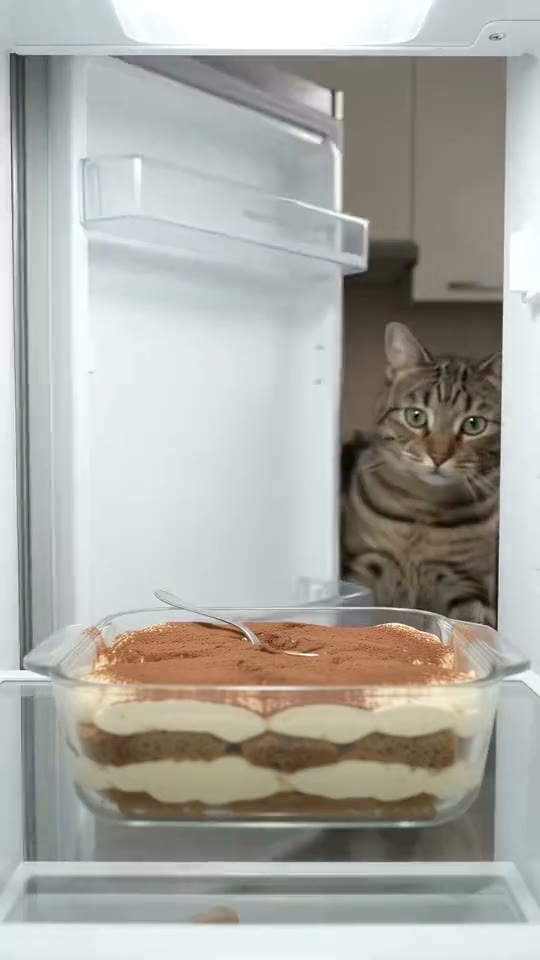

Three takes from the Tiramisu Fridge AI page: a person, a tabby cat and a kitten.
How to Make It in Four Steps
- Open the page. Go to Tiramisu Fridge AI. The original fridge cam clip is already loaded in the generator.
- Pick a take. Keep the original, or tap an example (a cat, a kitten, a late night snacker) and tap Recreate this. Recreate uses that example's own video, so you keep its fridge, its tray and its timing.
- Add one photo. Tap the + and add one clear photo of one person or pet. Head and shoulders is enough, because the fridge cam frames you from the shoulders up.
- Generate. Check the price on the button, tap Generate, and tap Download MP4 when it is ready, usually 3 to 8 minutes later.
What Photo Works Best
- A front facing face. The thief looks straight into the camera between bites. A straight on photo makes that look like your person.
- Soft, even light. The clip has cool fridge light on the face. A daylight photo blends in better than one with hard flash.
- One subject. One person or one animal per photo. Crop out anyone else.
- For pets: the pet looking at the camera, eyes visible, nothing covering the face. Cats and dogs are some of the most shared versions of this trend.
- Not allowed: photos of children, or of adults who did not agree.
What It Costs
SlapClip bills per second of video: 1 credit per second at 720p, the default (0.5 at 480p, 3 at 1080p). The takes on the Tiramisu Fridge page run 3 to 10 seconds, so a video costs 4 to 10 credits at 720p (clips under 4 seconds are billed as 4). Credits come in one time packs: 15 credits for $9.99, 45 for $24.99 and 100 for $49.99, with no subscription. The exact price is on the Generate button before you start, and failed renders are refunded automatically.
Tips for a Funnier Video
- Pick the right thief. The best versions star someone who is "on a diet", the roommate who never admits eating the leftovers, or a pet who should not be able to reach the shelf.
- Dress the part. Pajamas, a work uniform or a gym outfit all add to the joke, and the outfit in the photo is the outfit in the video.
- Post it as a caption joke. The video itself has no text on it. Add your own caption when you post, such as "just one bite", so the punchline is yours.
Fixing a Result That Looks Off
- The face does not look right. Use a sharper, closer photo. Faces that are small or blurry in the photo are the most common cause.
- The spoon or hands look strange. Hands and spoons are hard for every AI video model. Try another take, or retry once; a failed render costs nothing.
- The pet looks like a different animal. Use a photo where the whole face and the fur color are clearly visible.
Tiramisu Fridge AI vs a CapCut Template
Template apps paste a face onto the same sample person, so the body, clothes and hands stay theirs. SlapClip recasts the whole person or pet from your photo, so their outfit and build come through too, and the MP4 has no watermark. The trade off: every SlapClip video is a new AI render, so it is not free.
Frequently Asked Questions
What app lets me put my face into the Tiramisu in the Fridge meme?
SlapClip's Tiramisu Fridge AI page does it in the browser with one photo. There is no app to install and nothing to film.
Can I make it with just one photo?
Yes. One clear photo of one person or pet is all it needs.
Can my cat or dog be the one eating the tiramisu?
Yes. Pick a cat example and tap Recreate this, or keep the original clip, then add a clear photo of your pet.
How long is the video?
As long as the take you pick: the clips on the page run 3 to 10 seconds, in vertical 9:16 for TikTok, Reels and Shorts.
Where can I find more trends like this?
On the trends page. New trends arrive almost every day, and every one of them opens in the same generator.