
How to Make the Alors On Danse AI Video With Two Photos (2026 Step by Step)
Step by step, with screenshots: make the Alors On Danse AI keyboard duo with two photos. Tap a face to choose who plays the mini keyboard and who hypes, which photos work, pets included, and what one video costs today.
Short answer: open the Alors On Danse AI page, keep the original 20 second white studio clip or tap Recreate this on any example, tap a face on the still to choose who you replace, add one photo for the keyboard player and one for the hype man, tap Generate and pay at checkout if you need a video. In 3 to 8 minutes the MP4 shows the two of you in the white studio: one plays the Alors On Danse melody on a mini keyboard plugged into a laptop, the other points at the ceiling, claps and dances. A video costs 1 credit per second at 720p. Prices and screens below were checked on November 5, 2026.
What the Alors On Danse AI Trend Is
The bit comes from a 2010 comedy sketch around Stromae's hit Alors On Danse: the Belgian singer plays the melody on a small keyboard while French comedian Jamel Debbouze hypes him up beside him. In October 2026 a two photo AI template put any duo in that white studio, and remakes with grandparents, film pairs, mob bosses and dogs spread on TikTok. People search for it as Alors On Danse AI, the Alors On Danse AI original and the Stromae keyboard trend.
It is a duo meme, which is what makes it good for two people who like to roast each other: one is the serious musician, the other is the very loud fan.
What You Need
- One or two photos. One person (or pet) per photo, face clear, waist up.
- A phone or a computer. Everything runs in the browser.
- About 10 minutes. A couple to set it up, 3 to 8 for the render.
You do not need a photo of you together. Two separate selfies work.
Step 1: Open the Alors On Danse AI Page
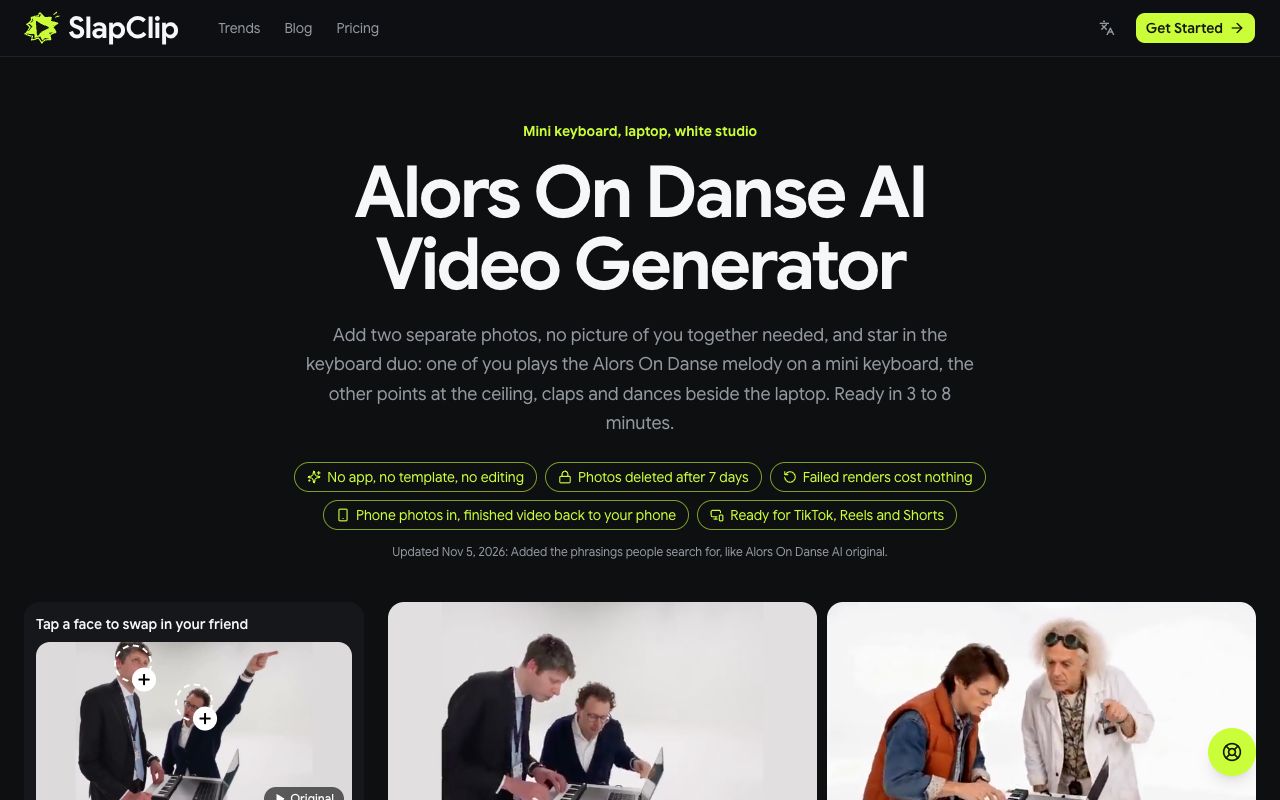
Go to the Alors On Danse AI page. The generator sits at the top with the original clip loaded, and the examples are beside it: Grandparents, Owner and Dog, Time Travelers, Wizard Duo, Mob Bosses, Studio Couple and Poodle and Chihuahua.
Step 2: Pick the Duo You Want to Remake
Keep the original if you want the sketch exactly as people know it. To use another version, open any example and tap Recreate this: that exact video loads into the generator. The panel shows the clip length, 20 seconds for the original, and the button shows its cost in credits.
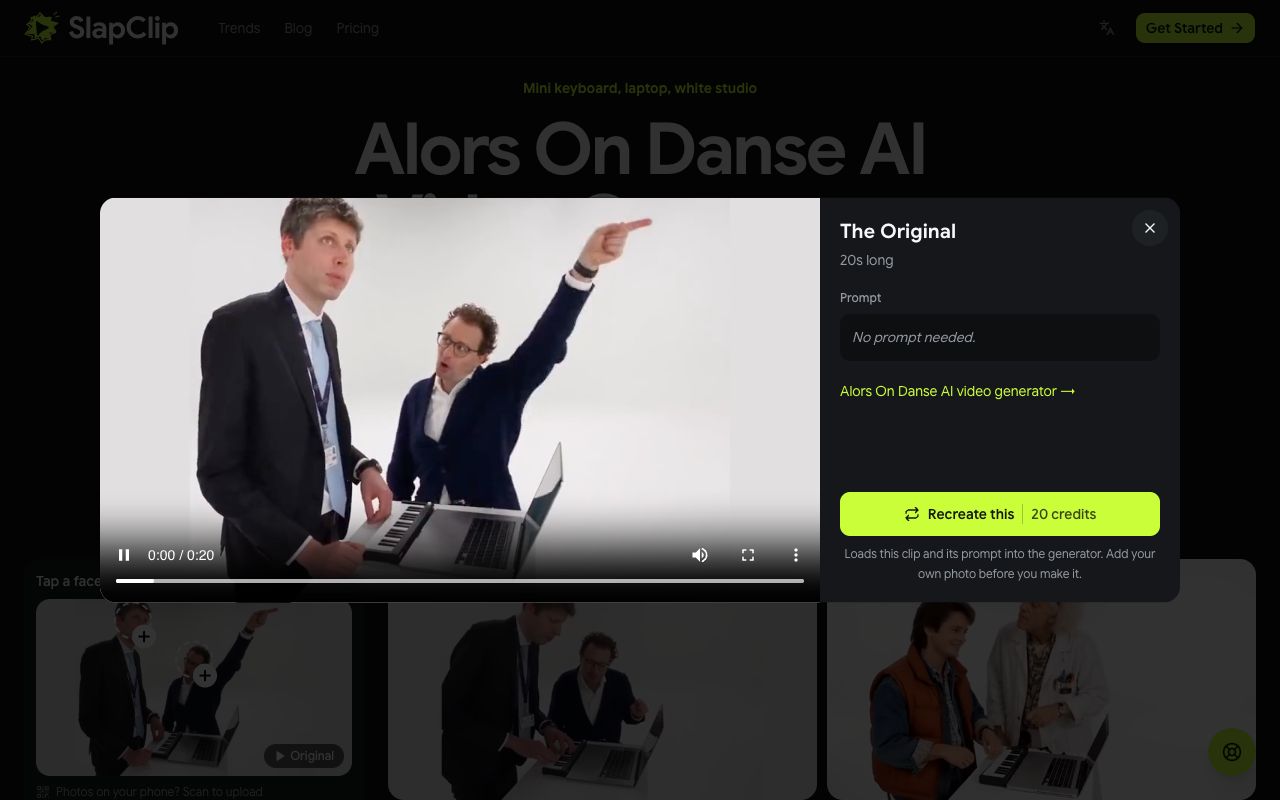
Recreate uses that example's own video as the reference, so the outfits and the framing of the take you picked stay, and only the two people change.
Step 3: Tap a Face and Add Your Photos
Above the photo slots the page shows a still of the duo with a circle on each face, under "Tap a face to swap in your friend". Tap the keyboard player to put a photo in his place, or the hype man for the other role. The slots are labelled At the keyboard and The hype man. Fill one to replace one person and keep the other, or fill both to replace the whole duo.

On a computer you can scan the QR code to send photos straight from your phone. A pet works in either role: the Owner and Dog example has a golden retriever as the hype man, and Poodle and Chihuahua has no humans at all.
Step 4: Check the Price and Generate
The generator shows the resolution (the sharpest size one Starter pack covers: 720p up to 15 seconds, 480p for longer clips), the credits it costs and that the video is ready in 3 to 8 minutes. Tap Generate. If your balance is short, checkout opens and shows the price before anything is charged. A failed render gives the credits back automatically.
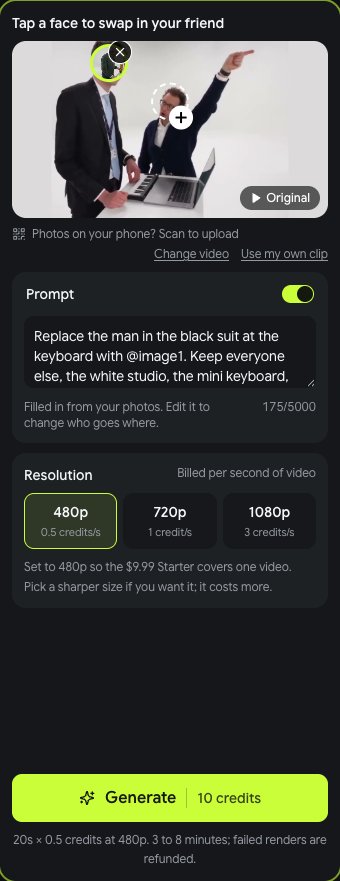
When it is done, tap Download MP4. The video keeps the sound of the clip, with no watermark and no app logo.
Who Should Play Which Role
- At the keyboard: the calm one. The friend who takes everything seriously, your dad, your boss with their OK.
- The hype man: the loud one. Your best friend, your sibling, or your dog.
- Swap the roles for a second video and post them side by side; it is the same two people with completely different energy.
What It Costs
SlapClip charges by the second: 1 credit per second of 720p video (480p costs half, 1080p three times). Credits come in one-time packs with no subscription, 15 for $9.99, 45 for $24.99 and 100 for $49.99, and they work on every trend on the trends page. The button shows the credits before you start, and a failed render gives the credits back automatically.
Tips for Two Faces That Look Right
- One face per photo. Crop out anyone else, or the wrong face can end up at the keyboard.
- Waist up. The clip is framed from the waist, so a waist-up photo carries the outfit too.
- Similar light in both photos. Two daylight selfies match better than one in daylight and one at night.
- Pets facing the camera. A clear look at the face and the markings keeps your dog looking like your dog.
- Only use photos you may use. Your own, or adults who agreed. No children.
Fixing a Result That Looks Off
If the two people end up in the wrong spots, check which circle you tapped: the role follows the face you picked, not the order you uploaded. If a face looks off, use a sharper, front-facing photo in better light. If an example does not suit your pair, try another; Mob Bosses and Studio Couple frame the duo much tighter than the original. More fixes are in why an AI video face looks off.
Frequently Asked Questions
Can I make the Alors On Danse AI video with one photo?
Yes. Fill one slot and the other person stays as they are in the clip you picked.
Do we need a photo together?
No. Two separate photos work, one per person.
Can my dog be the hype man?
Yes. A pet works for either role; see the Owner and Dog example.
Is the song in the video?
The video keeps the sound of the clip you pick. Add Alors On Danse from the TikTok or Instagram sound library if you want it on the song's page.
Is there a free Alors On Danse AI generator?
Not here. Every video is a new AI render, and the price is shown at checkout before you start. A failed render gives the credits back automatically.
Can I use my own clip?
Yes. The generator takes any 4 to 30 second clip; add photos and the people in it are recast.