
Dime Dime Baby AI for Couples: Make a Pair of Videos (2026)
How to do the Dime Dime Baby AI trend as a couple: one video for each partner, matching or rival scenes, how to post them as a pair on TikTok and Reels, and what two videos cost.
Short answer: the Dime Dime Baby AI page puts one person in each video, so a couple makes two videos: one with your photo, one with your partner's. Pick the same scene for a matching pair or two different scenes for a "who did it better" post, then put them side by side or back to back on TikTok and Reels. Each video is 9 seconds: 5 credits at 480p or 9 credits at 720p, so two 720p videos cost 18 credits, and the $9.99 Starter pack (15 credits) covers one at 720p plus one at 480p. Prices and page details were checked on November 22, 2026.
Why a Couple Makes Two Videos
Dime Dime Baby is a solo moment. In the original quinceañera clip one guy dances toward the camera, bites a concha and chews while staring into the lens. The page keeps that shape: you add one photo of one person, and that person does the walk, the bite and the stare.
That is good news for couples. Instead of squeezing two faces into one frame, each of you gets the full nine seconds, the close up and the deadpan stare. The fun is in the pairing: two versions of the same moment, posted together.
What You Need
- Two photos, one person each. Front facing, face fully visible, good light. Full body is a bonus because the dance starts wide.
- Your partner's OK. Their photo, their face, their say.
- About 15 minutes. Each video takes 3 to 8 minutes, and you can start the second while the first renders.
- Credits. 9 credits per video at 720p, 5 at 480p.
The best photos for Dime Dime Baby AI guide shows which photos work. The short version: no sunglasses, no hands near the face, no group shots.
Three Ways to Pair the Videos
Matching Scenes
Both of you in The Quince Guy, the original party. Same room, same moves, two different people. Posted side by side, it looks like a synchronized duet, and the differences in how each of you chews the concha are the joke.
Rival Scenes
Pick two scenes that say something about each of you. One of you takes the Neon Dance Floor, the other the Garden Party. Or one in the Garage Party hoodie look and the other in the Dance Studio. Caption it "who did it better" and let the comments vote.
The Pet Third Wheel
Make your two videos, then a third with your dog or cat through Your Pet Does It. Three takes of the same stare, one of them furry. Our dog and teddy bear guide covers the pet version.
The Dime Dime Baby AI scenes guide describes every scene if you want to compare them first.
Step by Step: Make Both Videos
Step 1: Open the Page
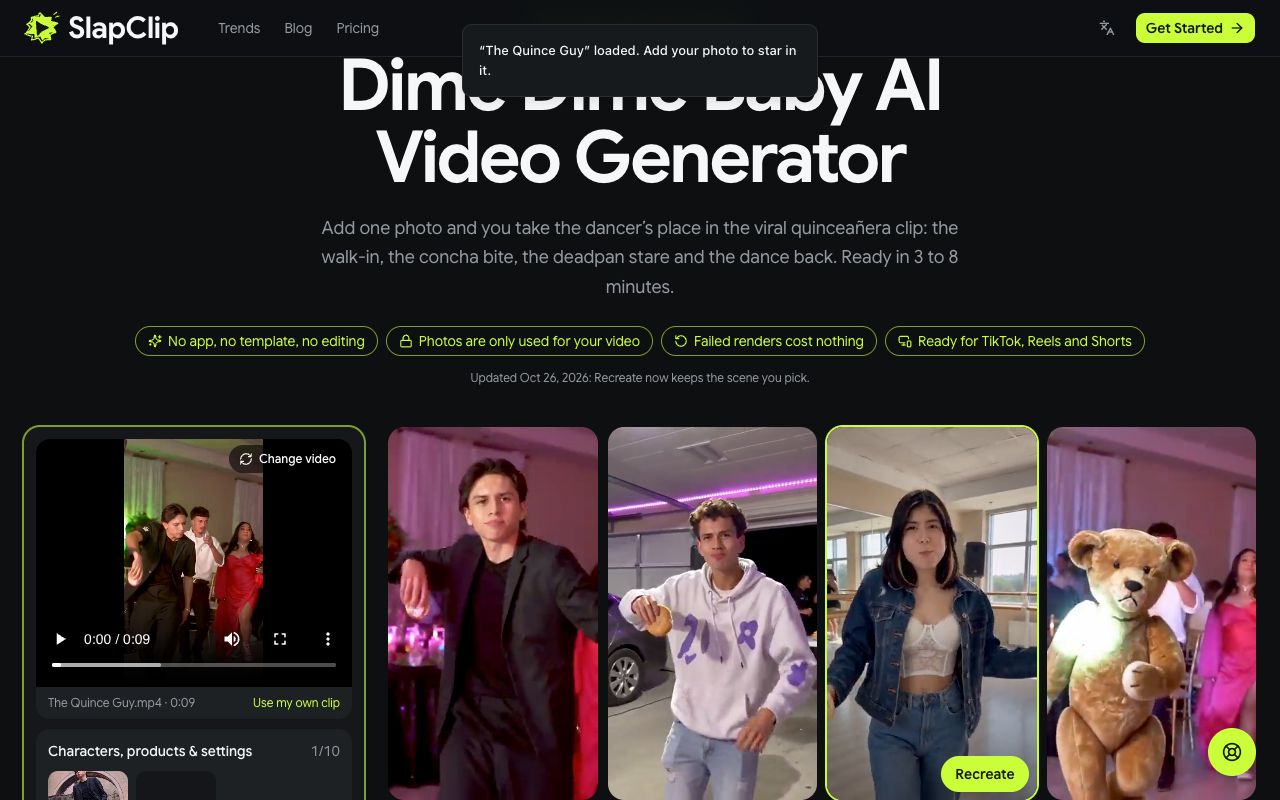
Go to the Dime Dime Baby AI page. The generator opens with the original clip, and the examples show every scene.

Step 2: Pick the First Scene
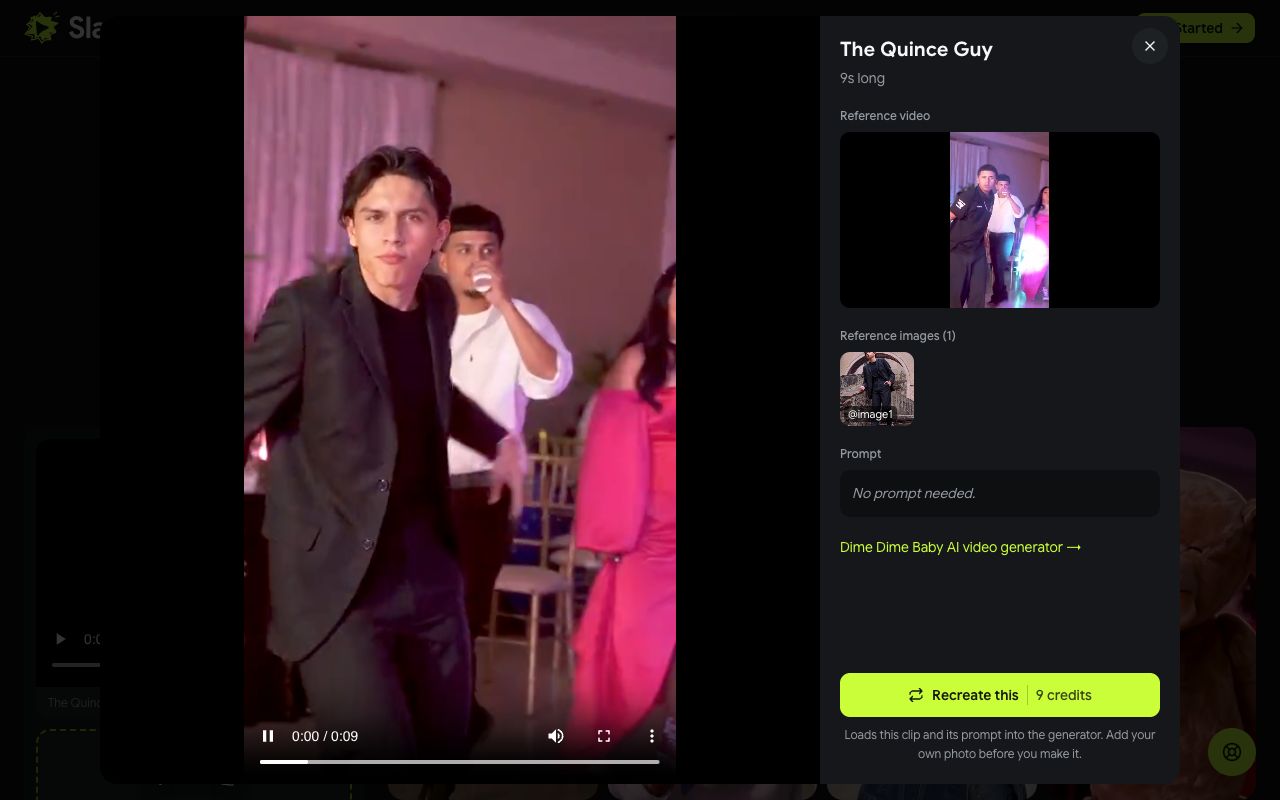
Tap the example you want for the first partner. It opens with sound and shows its length, and a Recreate this button loads its clip into the generator.
Step 3: Add the First Photo
Tap the + under the clip and add the first partner's photo. One person per photo: if two people are in it, the model has to guess which one dances.
Step 4: Check the Price and Generate
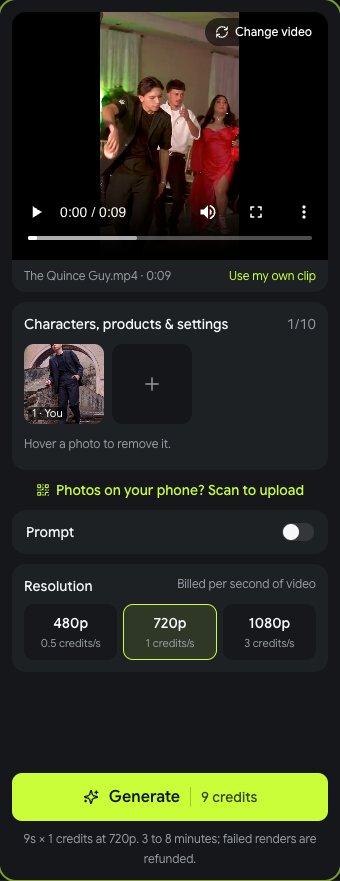
The Generate button shows the resolution and the credits before anything is charged. Tap it and the render starts.
Step 5: Repeat for Your Partner
Go back to the page, pick the same scene (matching pair) or a different one (rival pair), tap Recreate this, add your partner's photo and tap Generate. Both renders can run at the same time.
Step 6: Download Both
When each video is ready, tap Download MP4. You now have two 9 second vertical clips with sound and no watermark.
How to Post Them as a Pair
- Side by side: put both clips next to each other in any video editor that has a split screen layout. Matching scenes look best this way because the moves line up.
- Back to back: join the two clips one after the other for an 18 second video. Rival scenes work better here, with a caption like "round one" and "round two".
- A carousel or a reply: post one video, then the other as a reply or a second slide, and ask which one wins.
On TikTok and Instagram Reels, label the posts as AI generated when you upload; both platforms ask creators to. Our Dime Dime Baby for TikTok and Reels guide covers sizes and captions.
What Two Videos Cost
Every Dime Dime Baby scene is the same nine seconds, so every scene costs the same.
| Plan for the couple | Credits | Fits in | | ------------------------- | ------- | ----------------------------- | | Two videos at 480p | 10 | Starter, 5 credits left | | One at 720p, one at 480p | 14 | Starter, 1 credit left | | Two videos at 720p | 18 | Popular (45 credits), 27 left | | Two at 720p plus your pet | 27 | Popular, 18 left |
The Starter pack is $9.99 for 15 credits, Popular is $24.99 for 45 and Pro is $49.99 for 100. Credits last a year and work on every trend on the trends page. A failed render gives its credits back automatically. The Dime Dime Baby AI cost guide has the full breakdown.
A cheap way to start: make both at 480p first, see whose take is funnier, then remake the winner at 720p.
Tips for a Better Couple Pair
- Use similar photos. Two photos taken in the same light and from the same distance make the pair look like a set.
- Dress the part. The outfit in each photo is the outfit in the video. A suit and a party dress fit the quinceañera; a hoodie fits the garage.
- Keep it kind. It is a meme about a confident stare, not a roast. Ask before you post your partner's version.
- Fix, don't guess. If a face looks off, the fix a Dime Dime Baby AI video guide lists what to change before you try again.
Dime Dime Baby Couple FAQ
Can both of us be in the same Dime Dime Baby video? Not on this page. It takes one photo per video, so each partner gets their own nine seconds. Posting the two as a pair is how couples do the trend.
Do we have to pick the same scene? No. The same scene makes a matching duet; two different scenes make a rivalry post. Both cost the same.
How much do two videos cost? 18 credits at 720p, 10 at 480p, or 14 for one of each, which fits in the $9.99 Starter pack.
Can we add our dog? Yes. Tap Your Pet Does It, then Recreate this, and add a clear photo of the whole animal. It costs the same as a person.
Is there a watermark? No. Each MP4 comes with sound and no watermark or AI badge.
Ready? Open the Dime Dime Baby AI page, or start from the generator on the homepage.