
Tiny Desk AI for Couples: Put You and Your Partner in the Band (2026)
Make the Outstanding Tiny Desk AI video as a couple: which two spots to fill, how to make it a gift or a post together, the two photos that work best, what it costs and how to fix a result that looks off.
Short answer: open the Tiny Desk AI page, tap the lead singer and add your partner's photo, then tap the backup singer in the black cap and add yours. Tap Generate. Two photos cost the same as one: the 19.5 second set is about 10 credits at 480p, and the MP4 is ready in 3 to 8 minutes. Send it as a gift or post it together. Facts and prices below were checked on November 22, 2026.
Why Tiny Desk Works for Two
The clip is Charlie Wilson singing "Outstanding" at his NPR Tiny Desk Concert: headphones on, eyes closed, a slow head shake and a grin that says he means every word. The song title does half the work for a couple. Putting your partner on lead, singing "Outstanding" with total conviction, reads as a compliment and a joke at the same time.
Most Tiny Desk remakes fill the whole band with a team or a group chat. A couple version is smaller and more personal. One person sings, the other is right behind them in the band, and the rest of the musicians stay as the original players. That contrast, two familiar faces inside a real concert, is what makes it land.
Which Two Spots to Fill
The original set has five faces you can tap, and you can add up to 4 photos. For a couple, three setups work well:
- Your partner on lead, you on backup. Tap the lead singer for your partner and the backup singer in the black cap for you. The backup singer sits behind the desk with plenty of screen time, so you are in almost every shot together. This is the classic gift version.
- You on lead, your partner on sax. The sax player steps forward for the solo near the end, so your partner gets a big entrance after you have carried the song.
- Your partner alone on lead. One photo, the original band behind them. Simple, and the whole focus stays on them.
If you want both of you to feel like the star, make two versions and swap who sings lead. Each video is priced on its own.
As a Gift or a Post Together
The same video works two very different ways, so decide first.
As a gift. Keep it a surprise. Use a photo you already have of your partner, put them on lead and yourself in the band, and send the MP4 at a good moment: an anniversary morning, after a hard week, or the day they finally finish a big project. The joke is that they are singing "Outstanding" about getting through it.
As a post together. Make it as a pair, pick the photos together and post it on both accounts. Couples who post it this way usually choose the setup where both faces are on screen the whole time, lead and the backup singer in the black cap.
The Two Photos That Work Best
- One face per photo. A selfie of the two of you together makes the model guess who goes where. Crop it into two photos or use separate ones.
- Front facing, eyes visible. The lead singer turns his head a lot. A straight on photo gives the model the most to work with.
- Similar light in both. Two photos in similar light look like one band instead of two pasted faces.
- Head and shoulders is enough. The band is seen from the waist up.
- Glasses carry over. If your partner is known for their glasses, keep them in the photo.
Only use a photo of your partner if they would be happy to see it in the video.
Step by Step
Step 1: Open the Tiny Desk AI page
Go to slapclip.com/tiny-desk-ai. The generator is at the top with the original Tiny Desk set already loaded. The videos further down are versions other people posted, there to watch.

Step 2: Tap two faces and add your photos
Under Tap a face, add a photo, each band member has a ring. Tap the lead singer and choose your partner's photo. A numbered tag marks the face it fills. Then tap the backup singer in the black cap, or the sax player, and add your own photo.

On a computer with your photos on your phone, use Photos on your phone? Scan to upload.
Step 3: Check the price and generate
The generator picks the sharpest size a Starter pack covers, which for the 19.5 second set is 480p. The button shows the credits before anything is charged.
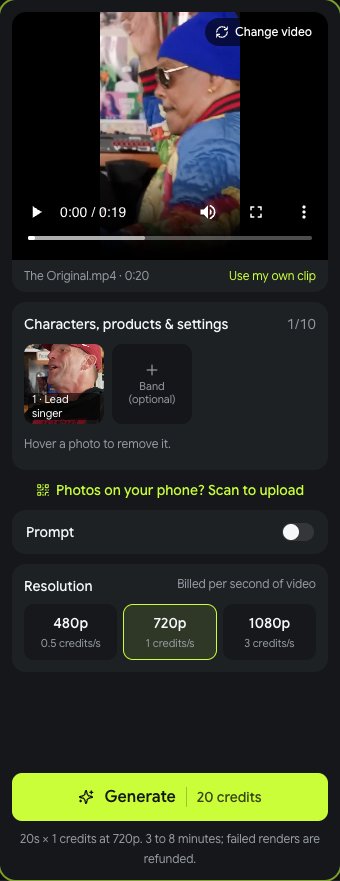
Tap Generate. The render takes 3 to 8 minutes and you can leave the page while it runs. Then tap Download MP4.
What a Couple Version Costs
The price follows the clip length and the resolution, not the number of photos, so two faces cost the same as one. A video costs 0.5 credits per second at 480p, 1 credit per second at 720p and 3 credits per second at 1080p. For the 19.5 second Tiny Desk set that is about 10 credits at 480p or about 19 at 720p.
Credits come in one-time packs with no subscription: 15 credits for $9.99, 45 for $24.99 and 100 for $49.99. A Starter pack covers one 480p version. The 45 credit pack is enough for two 720p versions, one with each of you on lead. Failed renders give the credits back automatically.
Couple Ideas That Work
- The anniversary morning. Your partner on lead, you on backup, sent before they wake up.
- The proposal hint. You on lead singing "Outstanding", your partner on sax. Save the real question for later.
- The long distance check in. Two selfies from two cities, one concert.
- The new apartment. Both of you in the band, posted the day you get the keys.
- The we survived the week post. You on lead, them on keys, both completely serious.
Fixing a Result That Looks Off
- One of you does not look right. Use a sharper, closer photo. Small or blurry faces are the usual cause.
- You swapped places. Check which ring each photo sits on before you generate. Remove a photo with its x and add it on the right face.
- You look too alike. Use photos with different outfits or hair visible, and make sure each face fills most of its photo.
Frequently Asked Questions
Can my partner and I both be in the Tiny Desk AI video?
Yes. Add one photo each and put them on two of the five faces, for example the lead singer and the backup singer in the black cap.
Does adding a second photo cost more?
No. The price depends on the length and the resolution only. The 19.5 second set costs about 10 credits at 480p with one photo or two.
Can we use a photo of the two of us together?
Use two separate photos instead, one face each. A shared photo makes it harder to place the right person on the right face.
Is it a good anniversary gift?
It works best as a funny extra, sent with the real gift or on the morning of the day. The MP4 has no watermark, so it is easy to share.
Can we post it on TikTok?
Yes. Download the MP4 and post it on TikTok, Instagram Reels or YouTube Shorts, and label it as AI generated, which these platforms ask creators to do.
Other trends for two are on the trends page, and every one of them works the same way in the generator.