
Tiny Desk AI With One Photo: Make It Solo, You Alone With the Band (2026)
Make the Outstanding Tiny Desk AI video with just one photo: which of the five seats to take, what happens to the seats you leave empty, the photo that works best and what a solo version costs.
Short answer: you only need one photo. Open the Tiny Desk AI page, tap the lead singer, add a clear photo of yourself and tap Generate. Every seat you leave empty keeps its original musician, so you end up fronting the real band: backup singers, keys and sax all still playing behind you. A solo version costs the same as a full band, about 10 credits at 480p for the 19.5 second set, and the MP4 is ready in 3 to 8 minutes. Facts and prices below were checked on November 23, 2026.
Can You Make Tiny Desk AI Alone?
Yes. Most Tiny Desk remakes fill the band with a team, an office or a family, so it is easy to assume you need a group. You do not. The original set has five faces you can tap, and each one is optional. Fill one and the other four stay exactly as they are in the original concert.
That makes the solo version the fastest way into the trend. There are no photos to collect from friends and nobody else to ask. It is also a different joke: instead of a whole group chat in the band, it is you, alone, being taken completely seriously by a professional band.
What Happens to the Empty Seats
This is the question people ask most before they try it, so here is exactly what happens:
- Seats you skip stay as the original players. They are not blurred, cut or replaced with random faces.
- The room stays the same. The cluttered desk, the camera, the timing and every move are kept.
- The sound of the set comes with it. The big "Outstanding" note and the sax solo land on the same beats as the original.
- Only your seat changes. Your face, hair, outfit and build come from your photo.
So a one photo video is not half finished. It looks like you sat in with a real band for one song.
Which Seat to Take
You can put your one photo on any of the five faces. Each seat tells a slightly different story.
- Lead singer. The obvious pick and the strongest. The lead singer has the close ups, the headphones, the closed eyes and the slow head shake. If the video is about you, this is your seat.
- Backup singer in the black cap. He sits behind the desk and is on screen for most of the set. Take this seat for a quieter joke: you, totally committed, singing backup for someone else.
- Sax. The sax player steps forward for the solo near the end. You wait, then you get your moment. Good for a delayed laugh.
- Keys. The woman at the red keyboard is lower in the frame. A subtle cameo that people spot on the second watch.
- Backup singer on the far left. The smallest part. Best saved for a group version, not a solo one.
If you cannot decide, make the lead singer version first. It is the one that reads in the first second, even with the sound off.
The One Photo That Works Best
With only one face in the video, that one photo carries everything. A few rules make the difference:
- Front facing, eyes visible. The lead singer turns his head a lot, and a straight on photo gives the model the most to work with.
- Sharp and well lit. Daylight from a window beats a dim restaurant or a night out.
- Your face big in the frame. Head and shoulders is enough; the band is seen from the waist up.
- One face only. Crop friends out of a group photo before you upload it.
- Wear the outfit you want on stage. What you wear in the photo is what you wear at the desk. A team cap or a loud shirt carries over.
- Skip the sunglasses. Clear eyes help the face read as you in the close ups.
The Tiny Desk photo guide has more detail and examples of photos to skip.
Step by Step
Step 1: Open the Tiny Desk AI page
Go to slapclip.com/tiny-desk-ai. The original Outstanding set is already loaded in the generator at the top. The videos further down are remakes other people posted on TikTok, there to watch for ideas.

Step 2: Tap one face and add your photo
Under Tap a face, add a photo, every band member has a ring. Tap the lead singer, or the seat you picked, and choose your photo. A numbered tag marks the face it fills. Leave every other ring empty.

On a computer with your photo on your phone, use Photos on your phone? Scan to upload.
Step 3: Check the price and generate
The generator starts on the sharpest size one Starter pack covers, which for this set is 480p. The Generate button shows the credits before anything is charged.
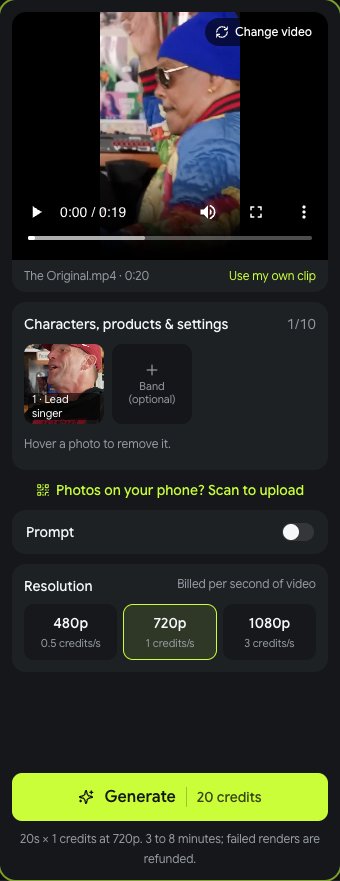
Tap Generate. It usually takes 3 to 8 minutes, and you can leave the page while it renders. Then tap Download MP4.
What a Solo Version Costs
The price follows the length of the clip and the resolution, never the number of photos. One face costs the same as five. Video is billed at 0.5 credits per second at 480p, 1 credit per second at 720p and 3 credits per second at 1080p, so the 19.5 second Tiny Desk set is about 10 credits at 480p or about 20 at 720p. The button always shows the exact number before you confirm.
Credits come in one time packs with no subscription: 15 credits for $9.99, 45 for $24.99 and 100 for $49.99. A Starter pack covers one solo video at 480p. If a render fails, the credits go back to your balance automatically. The full breakdown is in what a Tiny Desk AI video costs.
Because the price is the same, it is worth thinking about whether a friend or two would make the video better before you generate. If not, solo is a perfectly good video on its own.
Solo Ideas That Work
- The birthday self post. You on lead, singing "Outstanding" about yourself on your own birthday.
- The new job. Post it the day you sign the offer.
- Finals are over. You, eyes closed, completely at peace.
- The fantasy league win. Lead singer, team cap on, posted in the league chat.
- The sax cameo. You on sax only, with no caption, and let people find you.
- The test take. Make a solo 480p version first to check your photo, then do the full band later.
More trends that work with one photo are on the trends page, and you can also upload any clip of your own in the generator.
When Solo Looks Off
- The face does not look like you. Use a sharper, closer, front facing photo. Small or blurry faces are the usual cause.
- You landed on the wrong seat. Check which ring holds your photo before you tap Generate. Remove it with its x and add it on the right face.
- The outfit is wrong. The clothes come from your photo, so pick one that shows what you want to wear.
If something still looks off, the Tiny Desk fix guide goes through it seat by seat.
Frequently Asked Questions
Can I make the Tiny Desk AI video with just one photo?
Yes. Tap one face, usually the lead singer, add one clear photo and tap Generate. The other seats keep their original musicians.
What happens to the band members I do not replace?
They stay exactly as they are in the original Tiny Desk set. Nobody is removed or swapped for a random face, and the moves and timing stay the same.
Is a solo video cheaper than a full band?
No. The price depends only on the length and the resolution. The 19.5 second set is about 10 credits at 480p whether you fill one face or all five.
Which seat is best if I am alone?
The lead singer. That seat gets the close ups and the big note. The sax seat is a good second choice if you want your moment to arrive near the end.
Can I add friends to the same video later?
Not to a finished video. Make a new version with more faces filled. Each video is priced on its own.
Does the solo video have the song?
Yes. The sound of the set comes with the video, so the big note and the sax solo land on time. Label it as AI generated when you post it on TikTok, Reels or Shorts.