
Tiny Desk Meme Generator: Put You and Your Friends in the Band (2026)
What a Tiny Desk meme generator does, how to use the SlapClip Tiny Desk page step by step, how to pick who you replace in the band, which photos work and what one video costs.
Short answer: a Tiny Desk meme generator takes the Outstanding NPR Tiny Desk set and swaps the people in the band for people from your photos. On the Tiny Desk AI page the set is already loaded: tap a face in the band, add one clear photo for that spot, repeat for up to five people, then tap Generate. The MP4 comes back in 3 to 8 minutes with the desk, the shelves, the camera and every move kept, and your friends in the band. One video costs 10 credits at 480p, 19 at 720p or 57 at 1080p, however many faces you fill. Prices and screens were checked on November 20, 2026.
What a Tiny Desk Meme Generator Actually Does
The meme is one moment: Charlie Wilson at his NPR Tiny Desk Concert, headphones on, shaking his head and landing the big "Outstanding" while his band holds it down behind the desk. In October 2026 people started putting coaches, coworkers and whole families into that band, and "Tiny Desk meme generator" became the way people ask for a tool that does it for them.
A generator here means you bring photos, not editing skills. You do not cut the clip, track faces frame by frame or write a prompt. You choose a spot in the band, give it a face, and the video is rendered again with that person in the spot. Their face, hair and the outfit in the photo carry into the video, while the room and the performance stay as they were.
That is different from a face filter. A filter pastes a face over the singer, so the body, the beanie and the clothes stay his. Here the whole person is recast from your photo, which is why a friend in a hoodie shows up in a hoodie.
What It Does Not Do
A few things people expect that the page does not do, so you know before you start:
- It does not change the set. Every Tiny Desk video is made from the original 19 second performance. You cannot pick a different Tiny Desk concert or a longer cut.
- The examples are for watching. The remakes further down the page, from the All-Loss band to family bands, show what others posted. Opening one and tapping Make your own brings you back to the same original set, not to that remake.
- It adds no text. The MP4 has no watermark and no caption. If you want a title like "Q4 All-Loss Band", add it in TikTok or Instagram when you post.
How to Use the Tiny Desk Page, Step by Step
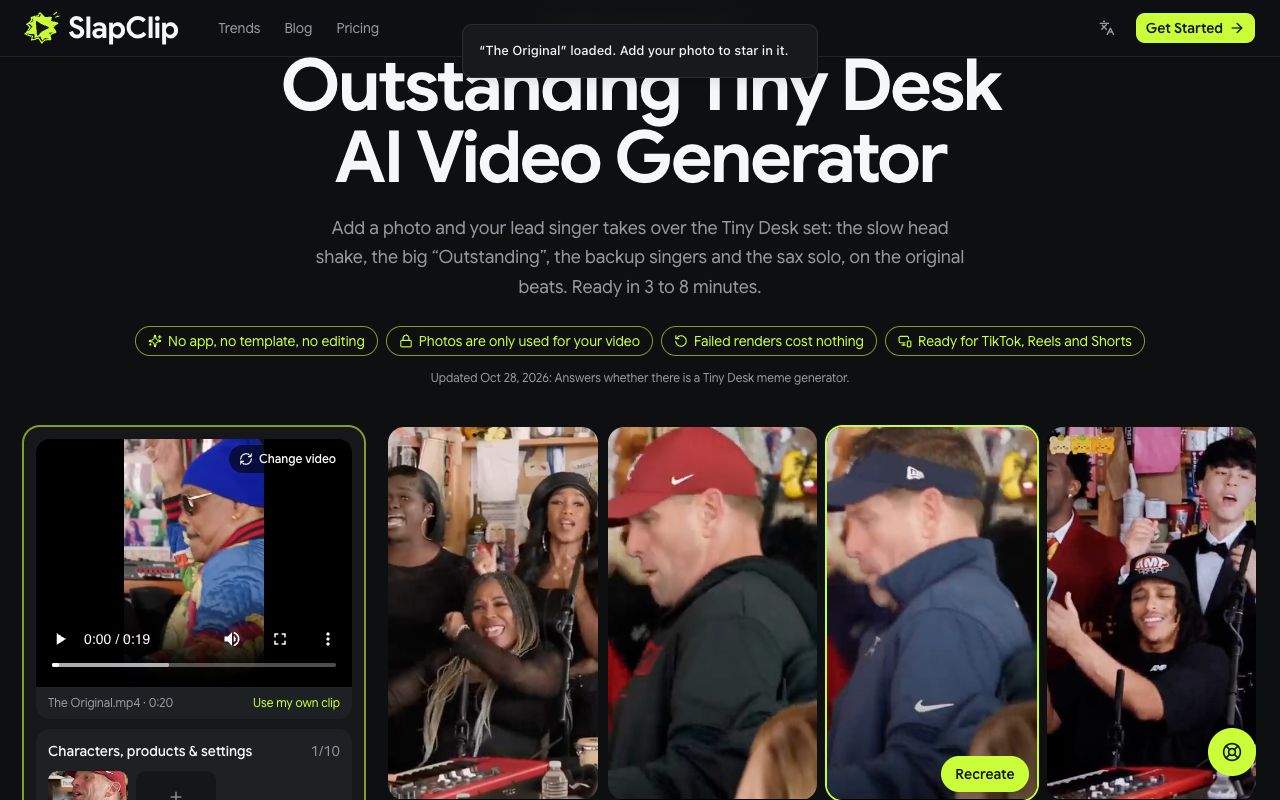
- Open the page. Go to slapclip.com/tiny-desk-ai. The generator sits at the top with the original set loaded and a 0:19 timer in the corner.
- Tap a face. Under Tap a face, add a photo, the frame shows a dashed ring on each of the five band members. Tap the one you want to replace.
- Add a photo. Choose a photo of that person. A numbered tag appears on the ring and the counter updates, for example "1 of 5 faces filled".
- Repeat or stop. Tap more rings for more people, or stop at one. Anyone you leave alone stays as in the original.
- Pick a quality and generate. Choose 480p, 720p or 1080p. The Generate button shows the credits before anything is used. Tap it, leave the page if you like, and come back for Download MP4.
Picking Who You Replace on the Stage
The stage has five faces you can tap:
- The lead singer in the blue beanie and gold sunglasses. He is in the most shots and gets the close-ups.
- The backup singer in the black cap.
- The woman at the red keyboard.
- The saxophone player.
- The second backup singer standing behind the band.
A few ways to decide:
- The lead is the joke. Whoever sings lead is the person the video is about: the coach after a loss, the birthday person, the coworker who never sings. Put your strongest photo there.
- Fill the band with the group. The original remakes worked because the whole band was one group everyone recognises: a coaching staff, a group chat, a family. Two or three familiar faces behind the lead make it land.
- A solo lead is fine. If you only have one person, put them at the mic and leave the band as it is. It reads as "my friend at a Tiny Desk concert".
- Check the ring before you generate. The numbered tag shows where each photo sits. If a photo landed on the wrong person, tap its x and add it again on the right face.
Always ask the people you put in the band first. For more on who suits which seat, see which spot in the band to fill.
Photo Tips That Save a Retry
Most results that look off come from the photo, not the generator. Before you tap Generate:
- Face the camera. A straight on shot with both eyes visible gives the most to work with. A profile or a face half turned away is the usual reason a face drifts.
- One person per photo. Crop a group shot down to the one face, or use a separate selfie. The photos do not need to be taken together.
- Bright, even light. Window light or a lit room. Deep shadows and backlit photos carry into the video.
- Sharp and close enough. A face that fills a good part of the photo beats a tiny face in a wide shot. Zoomed screenshots are often too soft.
- Dress the part on purpose. What they wear in the photo is what they wear in the band. Sunglasses stay on too, which can be the joke.
The full guide, spot by spot, is best photos for Tiny Desk AI, and how to fix a Tiny Desk AI video covers what to change after a render.
What the Generator Costs
You pay per second of video, and the set is 19 seconds. Checked on November 20, 2026:
| Quality | Credits | Good for | | ------- | ------- | --------------------------------------- | | 480p | 10 | A first try or a group chat | | 720p | 19 | TikTok, Instagram Reels, YouTube Shorts | | 1080p | 57 | A big screen at a party or an event |
Credits come in one-time packs: Starter, 15 credits for $9.99; Popular, 45 credits for $24.99; Pro, 100 credits for $49.99. There is no subscription, and credits last 12 months. A Starter pack covers one Tiny Desk video at 480p, which is why the generator shows "One $9.99 Starter pack covers 480p" and starts there. Popular covers two at 720p, and Pro covers five at 720p.
Filling one face or all five costs the same, so put the whole band in one render rather than one render per person. If a render fails, the credits go back to your balance on their own. The full breakdown, with ways to spend fewer credits, is in what a Tiny Desk AI video costs.
When the Video Is Ready
Rendering takes 3 to 8 minutes and can run longer at busy times. When it is done, tap Download MP4 and post it as it is: it runs the same 19 seconds as the original set. If you post on TikTok or Reels, label it as AI generated, which both platforms ask creators to do.
The same photos work on other trends on the trends page, or in any clip from the generator.
Tiny Desk Meme Generator FAQ
Is there a free Tiny Desk meme generator? Not on SlapClip. Every video is a new AI render, so it is paid in credits, starting with the $9.99 Starter pack that covers one 480p video. Failed renders are refunded automatically.
How many people can I put in the Tiny Desk band? Up to five: the lead singer, two backup singers, keys and sax. The price is the same for one face or five.
Do I need an app? No. The generator runs in the browser on a phone or a computer, and you download a plain MP4.
Can I use a different Tiny Desk concert? No. The page makes the Outstanding set only. To put yourself in another clip, upload it in the generator instead.
How long is the video? 19 seconds, the length of the original set, whichever faces you fill.