
Dime Dime Baby Meme Generator: Make the Concha Video From One Photo (2026)
What people mean by a Dime Dime Baby meme generator, how to make the concha bite video with your own photo on SlapClip in four taps, which photo works best and what one video costs.
Short answer: a Dime Dime Baby meme generator takes one photo of you and turns it into the viral quinceañera clip: you dance toward the camera, bite a concha, chew while staring into the lens and dance away. On SlapClip you open the Dime Dime Baby AI page, tap a take, tap Recreate this, add one photo and tap Generate. The video is 9 seconds and costs 9 credits at 720p, and the MP4 is usually ready in 3 to 8 minutes. Prices were checked on November 20, 2026.
What People Mean by a Dime Dime Baby Meme Generator
The Dime Dime Baby meme is one short clip. A young guy at a quinceañera, the "BbY WOW guy" or "concha guy", dances in, takes a bite of sweet bread, holds a deadpan stare and dances back into the party. The sound is BbY WOW by KAROL G. Once the clip went around in October 2026, people started searching for a way to put themselves, a friend or the family dog in his place.
When someone types "Dime Dime Baby meme generator", they usually want one of three things:
- A template. Drop in a picture and get the same video back, without editing anything.
- A face swap. Paste a face over the dancer. This is fast, but the body, hair and suit stay his, so the result looks like a mask.
- A full recast. The whole dancer is rebuilt from your photo: face, hair, build and outfit. The moves, the room and the camera stay the same.
SlapClip does the third. You do not paste a face onto someone else. The model watches the clip, keeps its motion and timing, and draws you doing it. That is why the outfit in your photo is the outfit in the video. If you are curious how the two approaches compare, our face swap versus recast guide shows the difference side by side.
What You Get From One Photo
- A vertical 9:16 MP4, 9 seconds long, the same length as the original clip.
- You in the dancer's place, from the walk-in to the bite to the stare.
- No watermark and no app logo in the corner.
- The same price for every take on the page.
There is no prompt to write. Every take on the page already carries what it needs, and the two takes that star an animal or a toy have their own short instruction built in.
How to Make It, Step by Step
Step 1: Open the Page and Pick a Take
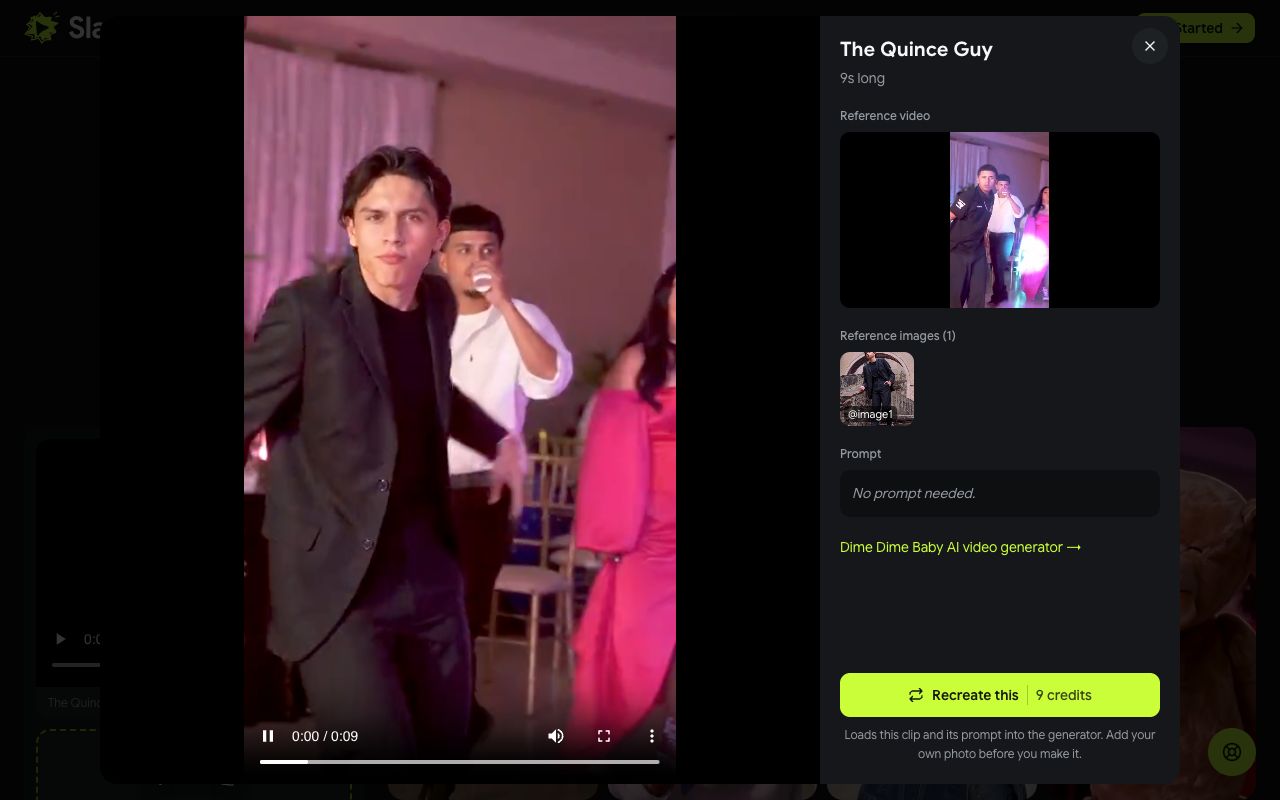
Go to slapclip.com/dime-dime-baby-ai. The examples sit next to the generator. Each one is the same nine seconds in a different room: The Quince Guy (the original party), Garden Party, Garage Party, Neon Dance Floor, Dance Studio, Your Pet Does It and Your Plushie Does It. Tap one to watch it with sound.
Step 2: Tap Recreate This
The open take shows its length and a Recreate this button with the credits next to it. Tapping it loads that exact video into the generator, so your version keeps that room, those lights and that camera.
Step 3: Add Your Photo
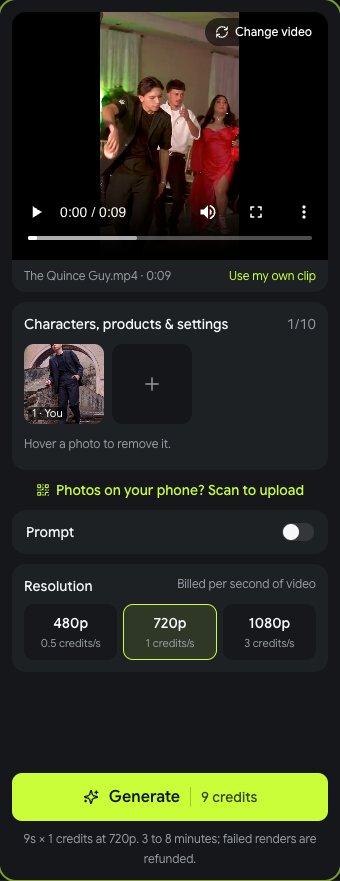
Tap the + under the clip and choose one picture. If the photo is on your phone and you are on a laptop, tap Photos on your phone? Scan to upload and pick it there. The tips below help you choose.
Step 4: Check the Price and Generate
The resolution row shows 480p, 720p and 1080p with their rate per second, and the Generate button shows the total. Tap it, pay at checkout if you have no credits yet, and leave the page if you like. When the video is done, tap Download MP4.
For a longer walkthrough with every screen, see how to make the Dime Dime Baby AI video.
Photo Tips for a Generator That Has to Get Close
This clip is harder on a photo than most trends because the bite happens right in front of the lens. For a second or two, the face is most of the frame. A few choices make the difference:
- Pick a photo where your face is big and sharp. Zoom in on your phone before you upload it. If the eyes are soft, they will be soft in the stare too.
- Look at the camera. The joke is the eye contact. A side profile gives the model less to work with for that moment.
- Show some of your outfit. The dancing at the start and the end is wider, so a photo from the waist up or a full body shot gives the clothes a chance to come through.
- Keep it to one person. If your photo has friends in it, crop them out first, or the model has to guess who the dancer is.
- Leave the mouth free. Skip photos with a hand, a drink or a mask over the lower face; the chewing needs a clear mouth.
- Pets and plushies need the same care. A sharp photo of the whole animal or toy, facing the camera, in good light.
If a first take still looks off, how to fix a Dime Dime Baby AI video goes through the usual causes, and the best photos guide has more examples.
What It Costs
SlapClip charges by the second of video, and Dime Dime Baby is 9 seconds whichever take you pick:
| Size | Credits | When to pick it | | ----- | ------- | ---------------------------------- | | 480p | 5 | Trying out a new photo | | 720p | 9 | Posting on TikTok, Reels or Shorts | | 1080p | 27 | Playing it on a big screen |
Credits come in one time packs with no subscription: Starter is $9.99 for 15 credits, Popular $24.99 for 45 and Pro $49.99 for 100. The Dime Dime Baby page lists that as about 1 video at 720p with Starter, about 5 with Popular and about 11 with Pro. Credits last 12 months and work on any trend on the trends page. If a render fails, the credits return to your balance on their own.
For the full breakdown by pack, read how much a Dime Dime Baby AI video costs.
Is It Really a Generator if There Is No Template Link?
Yes, and that is the point. Template apps hand you a link and a fixed effect. Here the template is the clip itself: every take on the page is a ready reference, and the generator does the rest from your photo. You can also start from the clip of your own: the generator on the homepage takes any short video and a photo and recasts the person in it.
Dime Dime Baby Meme Generator FAQ
Is the Dime Dime Baby meme generator free? No. Each video is a new AI render, so SlapClip is pay as you go. The smallest pack, $9.99 for 15 credits, makes one 720p Dime Dime Baby video with credits to spare.
How long is the video? Nine seconds, the length of the original quinceañera clip. Every take on the page is the same length.
Do I need to write a prompt? No. Pick a take, tap Recreate this, add a photo and generate.
Can I put my dog or a teddy bear in it? Yes. Tap Your Pet Does It or Your Plushie Does It, then Recreate this, and add a clear photo of the animal or toy.
Does the song come with it? No. The song belongs to its rights holders, so it is not baked into the MP4. When you post on TikTok or Reels, add BbY WOW from the app's music library; our TikTok and Reels guide shows how.
Can I make one for each friend? Yes, one photo per video. Ask your friends before you use their photos, and make a video for each one.