
Hotel Lobby AI Thanksgiving Video: Send Your Family a Duet (2026)
A Thanksgiving 2026 idea: put two people from your family or friend group in the Hotel Lobby orange booth and send the video on Thursday, November 26. Which duo to pick, how to get the photos, when to make it and what it costs.
Short answer: pick two people from your Thanksgiving table, open the Hotel Lobby AI page, tap the man in the striped shirt and add the first photo, tap the man in the orange shirt and add the second, then tap Generate. In 3 to 8 minutes you have a 20 second MP4 of the pair performing the Hotel Lobby duet in the orange booth with the hanging microphone. Make it by Wednesday night and drop it in the family chat on Thanksgiving, Thursday, November 26, 2026. One video costs 10 credits at 480p or 20 at 720p, and a $9.99 Starter pack (15 credits) covers one at 480p. Prices and steps checked on November 23, 2026.
Why Hotel Lobby Fits Thanksgiving
Thanksgiving group chats fill up with the same things every year: a photo of the turkey, a blurry shot of the table and a "Happy Thanksgiving!!" from everyone at once. A Hotel Lobby video stands out because it is the opposite of a holiday card. Two people from your family, the ones nobody would ever picture in a rap booth, lean into one vintage microphone and trade lines like a duo that has been on tour for years.
It also fits the day. It is 20 seconds, so people watch it between courses. It is vertical, so it plays full screen on every phone at the table. And it only needs two photos, which you probably already have in a shared album.
Pick the Duo
The Hotel Lobby frame has two performers, so the whole idea comes down to which two people you put in it. The pairs that get the biggest reaction at Thanksgiving:
- The two cooks. Whoever made the turkey and whoever made the pie, side by side at the mic.
- Mom and Dad. The couple that hosts every year, finally getting their own stage.
- The grandparents. The least likely rap duo in the family, which is exactly why it works.
- The siblings who argue every year. Put them in one booth and let them settle it in the duet.
- You and the relative who cannot make it. Two photos from two cities, one booth, sent to the person who is missing dinner.
- Your Friendsgiving pair. You and the friend who always hosts.
You can also fill only one face. Anyone you skip stays as the original performer, so a solo take puts one person from your family next to the original rapper.
Who Goes Where
The man in the striped shirt is on the left; the man in the orange shirt is on the right. In the generator, each has a ring you tap to add a photo. A simple way to decide: put the louder one, the person who carves, gives the toast or starts the arguments, on the left. Put the calm one on the right. If you want the video to be about one person, give them the left spot.
Get the Photos Without a Group Project
You need one photo of each person. You do not need a photo of the two of them together.
- Use one you already have. A shared family album, last year's Thanksgiving or a recent vacation photo all work.
- One face per photo. Crop a group shot down to one person before you upload it.
- Front facing and clear. No sunglasses, no hands near the face, no heavy filter.
- Waist up is better than a tight selfie. The booth is a medium shot, so a bit of shoulder and outfit looks natural.
- Similar light. Two daylight photos match better than one in sunlight and one in a dark kitchen.
- The outfit carries over. A holiday sweater, a team jersey for the game or an apron in the photo becomes the outfit in the booth.
Only use photos of adults who would be happy to see themselves in the video. If someone in your family hates being online, keep the video in the family chat. More detail is in the best photos for Hotel Lobby AI.
Step by Step
- Open the page. Go to slapclip.com/hotel-lobby-ai. The original performance is already loaded in the generator at the top.
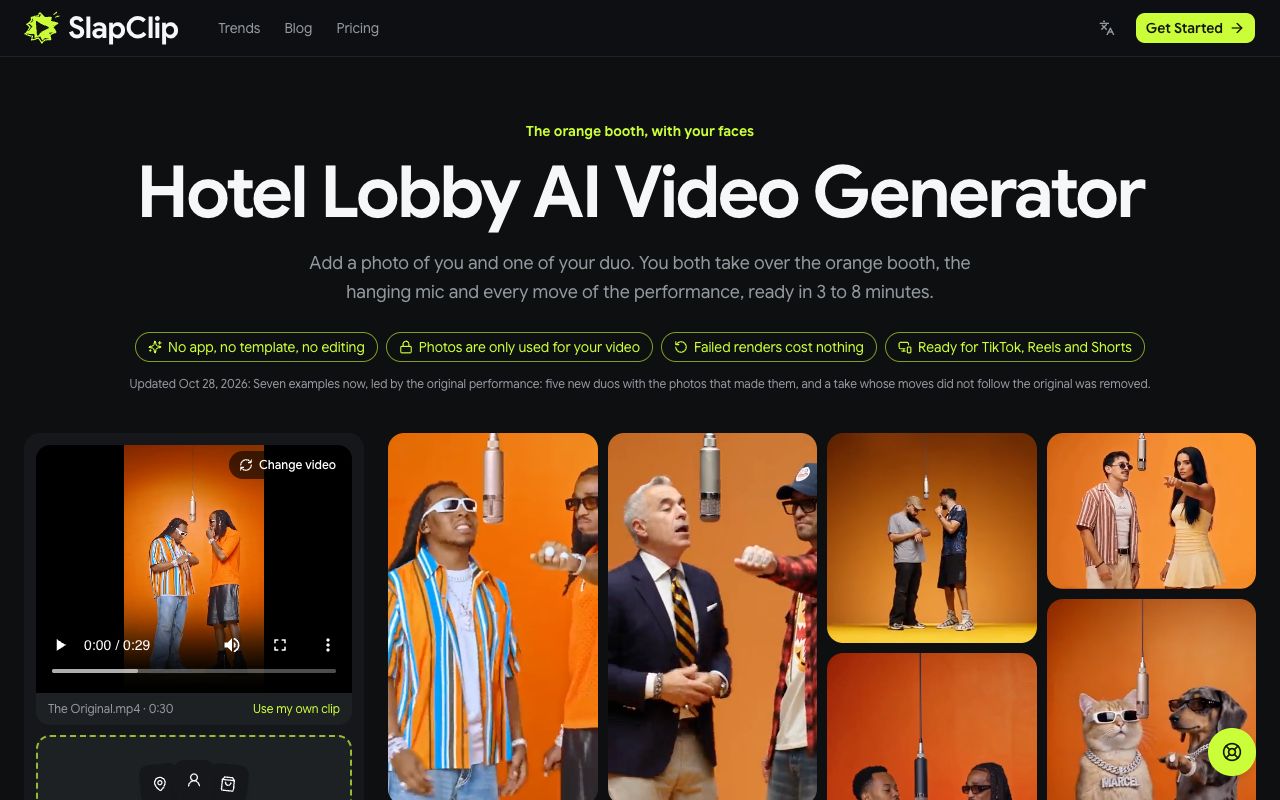
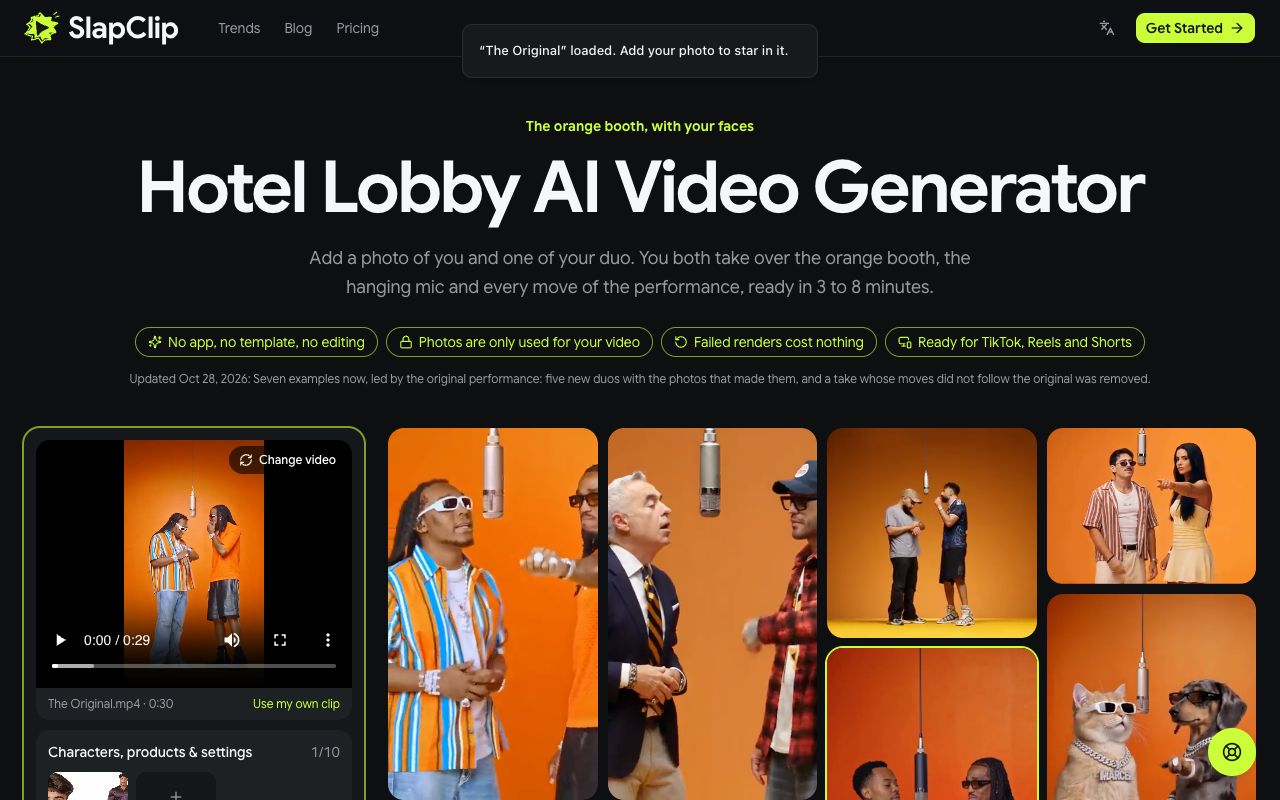
- Tap a face and add each photo. Tap the man in the striped shirt and pick the first photo, then tap the man in the orange shirt and pick the second. The counter shows 2 of 2 faces filled when both are in.
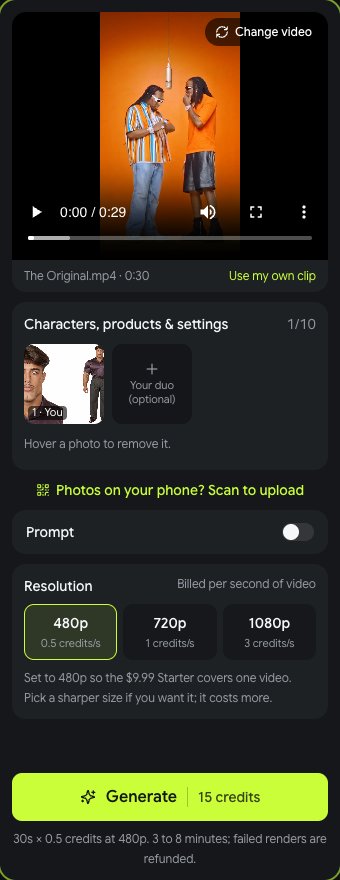
- Check the price and generate. Pick a resolution, read the credits on the button and tap Generate. You can close the page while it renders and download the MP4 when it is ready.
The full walkthrough with every screen is in how to make the Hotel Lobby AI video.
When to Make It
Thanksgiving 2026 is Thursday, November 26. Plan backward from that:
- Monday or Tuesday: collect the photos. This is the slowest part, especially if you need one from a relative.
- Wednesday: make the video. A render usually takes 3 to 8 minutes, sometimes longer at busy times. Making it a day early leaves room for a second try with a sharper photo.
- Thursday: send it. Thanksgiving morning, before everyone starts cooking, or right before dinner when the whole family is looking at their phones anyway.
If you want to play it at the table, download it to your phone first, so you are not waiting on the house Wi-Fi.
Five Ways to Send It
- The morning message. First thing in the family chat on Thursday, before the first turkey photo.
- The table reveal. Play it on a phone or the TV after grace and before the food goes around.
- The one for whoever is missing. Send it to the relative who could not travel, with them in the booth.
- The host thank you. Put the hosts in the booth and send it the next morning as a thank you.
- The Friendsgiving opener. Post it in the group chat when the date is set, as the invitation.
Add the Sound and a Caption
The song is not added to the video, because it belongs to its rights holders. If you post it on TikTok or Instagram, add the official "Hotel Lobby" sound from the app's music library, which is how most remakes are posted. In a family chat, it works without sound too.
Write the caption yourself, short and specific: who is in the booth and why. "The pie committee" or "Grandma and Grandpa, live from Thanksgiving" tells people what they are watching. If you post it publicly, label it as AI generated, which TikTok and Instagram ask creators to do.
What It Costs
Credits come in one time packs with no subscription: 15 credits for $9.99, 45 for $24.99 and 100 for $49.99. A video costs 1 credit per second at 720p, half that at 480p and three times that at 1080p. The Hotel Lobby original runs 20 seconds, so one Thanksgiving video is 10 credits at 480p, 20 at 720p or 60 at 1080p, the same whether you fill one face or two. The generator starts on the sharpest size one Starter pack covers. If a render fails, the credits go back to your balance automatically.
With a Popular pack (45 credits) you can make four 480p versions, for example one for each side of the family. Other holiday ideas are on the trends page, and the generator takes your own clip too.
Frequently Asked Questions
Can I make a Hotel Lobby AI video for Thanksgiving with two family members?
Yes. Add one photo of each person, one on the man in the striped shirt and one on the man in the orange shirt, and tap Generate. They do not need to be in the same photo.
How early should I make it?
Make it by Wednesday, November 25. A render usually takes 3 to 8 minutes, but a day of slack leaves time for a second try with a better photo.
Can I use an old photo of my grandparents?
Yes, as long as the face is clear, front facing and not too small. Crop it so only one person is in each photo.
Does the video have the Hotel Lobby song?
No. Add the official "Hotel Lobby" sound from the TikTok or Instagram music library when you post it. In a family chat it plays fine without it.
How much does one Thanksgiving video cost?
10 credits at 480p, 20 at 720p or 60 at 1080p. The $9.99 Starter pack has 15 credits, enough for one video at 480p.
Can more than two people be in it?
No. The Hotel Lobby frame has two performers, so it takes up to two photos. For a bigger family, make a few duos or try a band trend from the trends page.